CASE FILE 05/13CLASS: SAMPLE BUILDDATA: REALISTIC, NOT CLIENTTYPE: Billing & invoicing automation
Sample build: realistic data, built to show how I'd handle this work. Not client work.
Sample buildBilling & invoicing automation
Invoicing, payables and cash-flow automation in Google Sheets
8 invoices numbered, taxed and exported to PDF, with 6/6 sheet checks passing
- 8invoice lines
- 11,725.30gross invoiced in the test run
- 2 of 6bills held for review
- 6/6formula checks pass
01Summary
- Invoices, supplier bills and cash planning move into one Google Sheet with Apps Script (7 functions) doing the repeat steps.
- 8 invoice lines are numbered by series and taxed by client type; 2 of 6 bills are held for review.
- 6 of 6 formula checks pass on every change.
8 invoice lines are numbered by series and taxed by client type; 2 of 6 bills are held for review.
Key point, computed from the sample files
02The scenario
In this scenario invoices are numbered by hand, so gaps and duplicates creep in. Tax depends on the type of client (local, cross-border business, export), and that rule lives in someone's head. Supplier bills arrive by email and are typed into a list.
Source: sample files
03Issues in the data
Source: sample files
04How I approached it
- A Catalogue of 10 items and a Clients tab with tax type and payment terms for each client (Customer A to F).
- An Invoices tab that numbers each invoice by series, applies the tax rule for the client type, and sets the due date from the payment terms.
- Apps Script (7 functions) to issue an invoice, export it as a PDF and create an email draft. The script only creates the draft; nothing is sent automatically.
- A Payables queue where bills read from email below 80% confidence are held for a person to check.
- A 13-week cash-flow tab and a Checks tab that tests the workbook every time it changes.
Source: my design and the sample files
05How this applies to your business
- Assess and designMap the current process, size the gaps from your own data, agree the design and a written scope.
- Build and testBuild in your own tools with the checks built in, then run real cases end to end.
- Document and hand overSOPs, a walkthrough and a handover, so your team runs it without me.
| Activity | Business owner | Specialist (me) | Your team |
|---|---|---|---|
| Keep catalogue and clients current | A | C | R |
| Build sheet and script | A | R | I |
| Approve held bills | A | I | R |
| Send invoices | A | I | R |
Source: sample plan
06Controls and checks
| Check | What it catches | Status |
|---|---|---|
| Invoice count = 8 lines | Rows lost or added by a bad paste | PASS |
| Gross = net + tax on every line | A broken formula on any line | PASS |
| No tax on cross-border or export lines | Tax charged where it should not be | PASS |
| Invoice numbers unique | Duplicate numbering | PASS |
| Low-confidence payables held (< 80%) | Misread bills going straight to payment | PASS |
| Closing = opening + sum of net | Cash-flow roll-forward errors | PASS |
Source: sample files (Checks / Controls tab, test output or run log)
07What the files show
- 8invoice lines
- 11,725.30gross invoiced in the test run
- 2 of 6bills held for review
- 6/6formula checks pass
Source: sample files, measured by script. Sample data, not a client result.
- 6 of 6 checks on the Checks tab return PASS, including gross = net + tax on every line and unique invoice numbers.
- Tax is applied to 4 domestic lines only; cross-border and export lines carry none.
- 134 live formulas, so the numbers update when the inputs change.
- The sample PDF invoice was produced by the same export step and opens with matching totals.
08Risks and how the build handles them
| Risk | Mitigation built in |
|---|---|
| A wrong tax rate is applied | Tax comes from the client type; a check confirms no tax on export lines |
| Invoice numbers clash | Script reads the series; uniqueness check on every change |
| An email goes out by mistake | Script only creates drafts |
Source: sample design
09Appendix: files
A. Screenshots of the deliverable
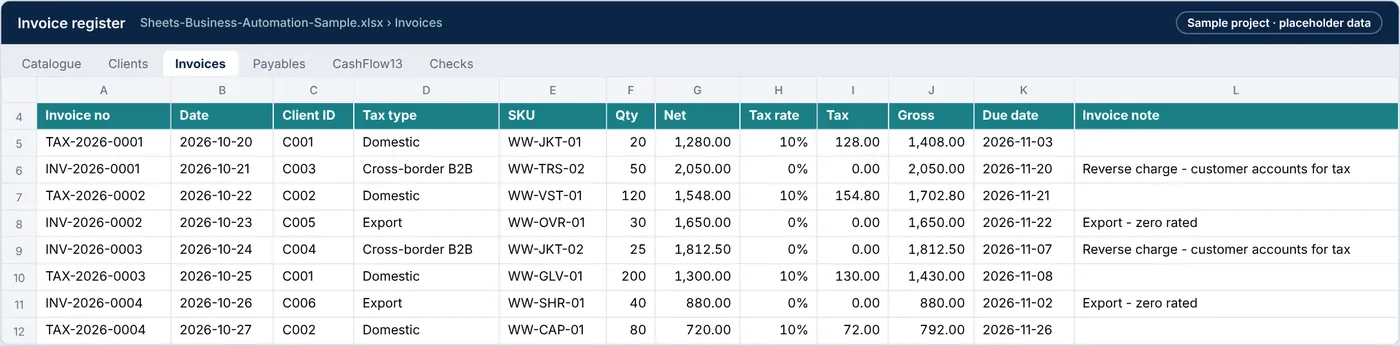
Exhibit 8: Invoices tab with automatic invoice numbers, tax by client type and due dates from payment terms
Source: sample files
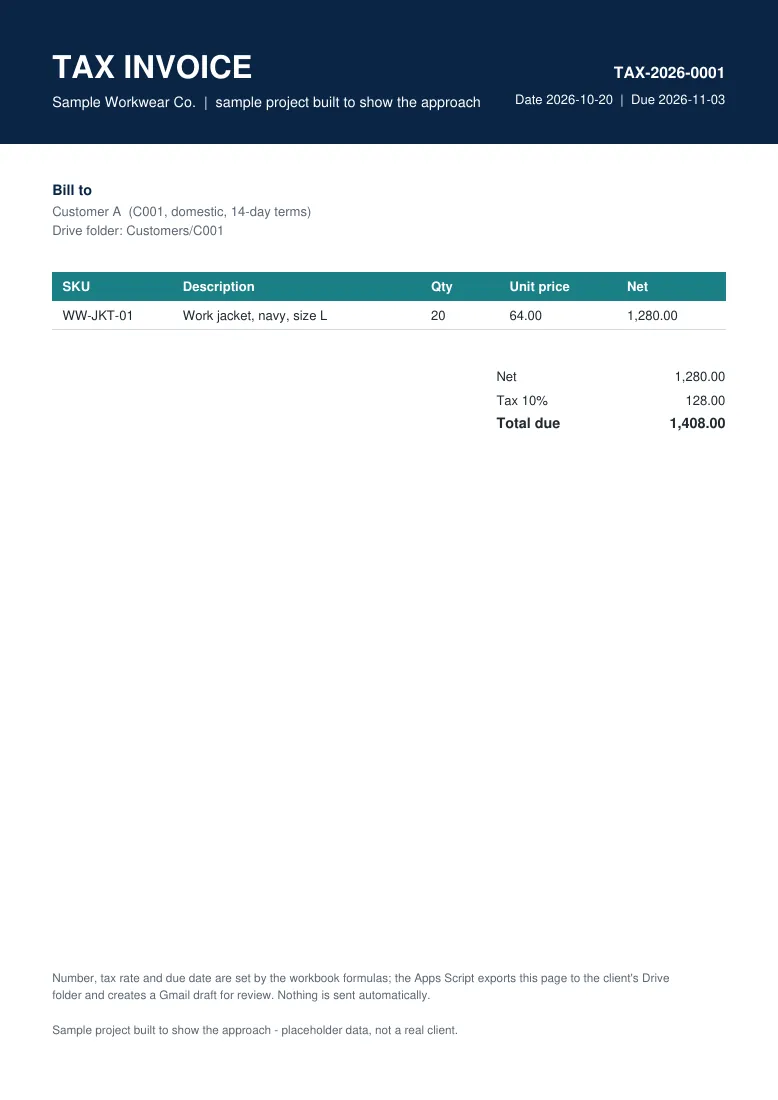
Exhibit 9: Invoice PDF generated from the sheet for Customer A
Source: sample files
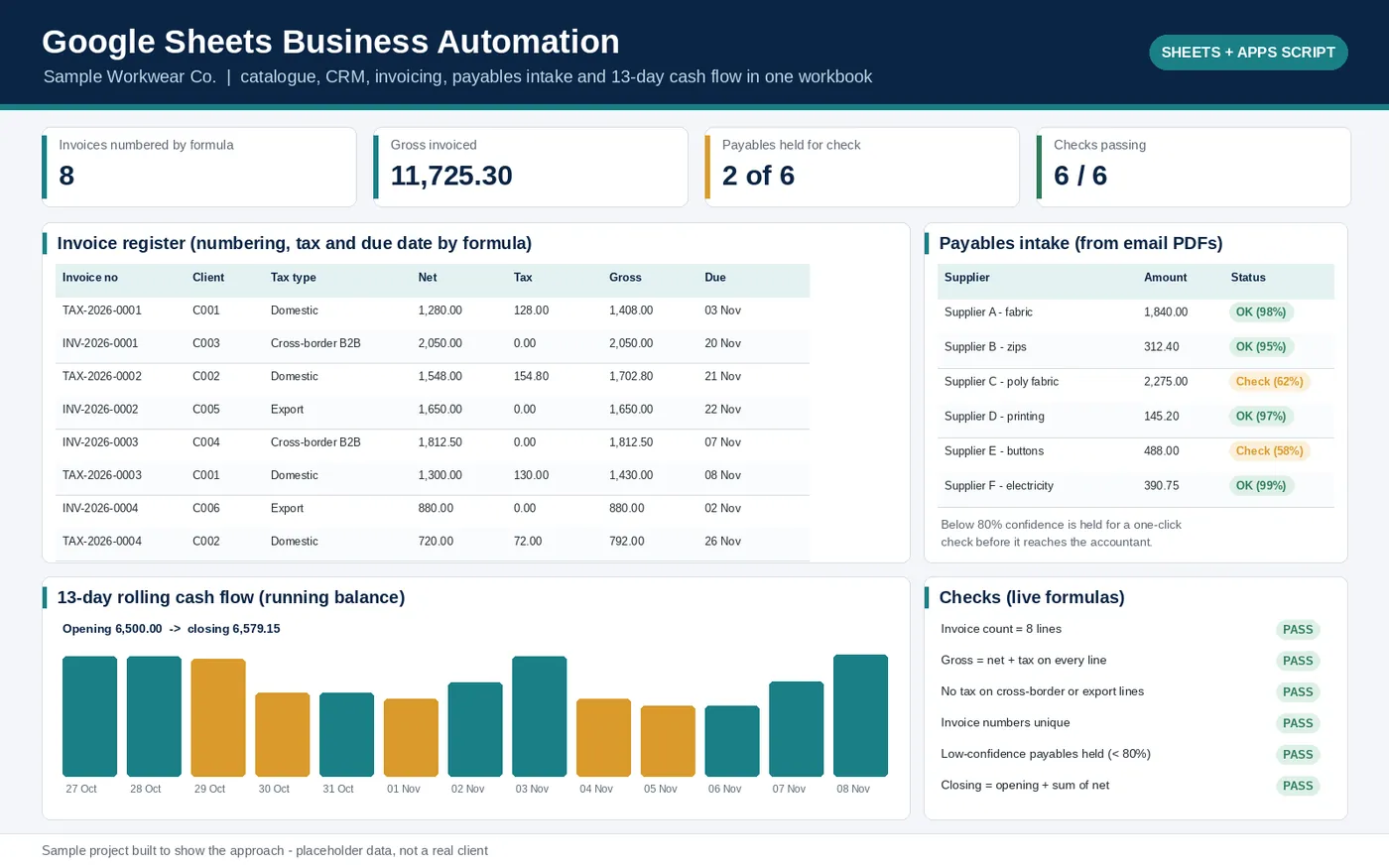
Exhibit 10: Overview of the Google Sheets automation sample: invoice register, payables queue, 13-week cash flow chart and formula checks
Source: sample files
function nextInvoiceNumber(taxType, year) {
  const prefix = taxType === 'Domestic' ? 'TAX' : 'INV';
  year = year || new Date().getFullYear();
  const stem = `${prefix}-${year}-`;
  const nums = SS.getSheetByName('Invoices').getRange('A5:A').getDisplayValues().flat()
    .filter(n => n.startsWith(stem)).map(n => Number(n.slice(stem.length)));
  return stem + String((nums.length ? Math.max(...nums) : 0) + 1).padStart(4, '0');
}

/** Domestic 10%, cross-border B2B reverse charge 0%, export 0%. Edit to your own tax table. */
Source: Code.gs
B. Downloadable files
| File | What it is | Size |
|---|---|---|
| Sheets-Business-Automation-Sample.xlsx | Workbook: catalogue, clients, invoices, payables, 13-week cash flow and checks | 12.9 KB |
| Code.gs | Apps Script: invoice numbering, tax rule, PDF export, draft email, logging | 3.1 KB |
| Sample-Invoice-TAX-2026-0001.pdf | Invoice PDF produced by the export step | 2.4 KB |
Sample build: realistic data, built to show how I'd handle this work. Names are placeholders and no client data is used.
Have a similar problem in your business?
Hire me on Upwork (opens in a new tab)