CASE FILE 03/14CLASS: SAMPLE BUILDDATA: REALISTIC, NOT CLIENTTYPE: Bookkeeping & reconciliation
Sample build: realistic data, built to show how I'd handle this work. Not client work.
Sample buildBookkeeping & reconciliation
QuickBooks Online to Xero migration: every balance proven at conversion
QuickBooks Online to Xero with 0 balance differences at conversion, after 24,198.79 of sales counted twice was found and fixed
- 0of 65 Xero balances differ from QBO
- 742,980.26open receivables carried over
- 24,198.79sales counted twice, found
- 32/32controls pass
01Summary
- In this scenario a Melbourne joinery and shopfitting business moves from QBO to Xero at 30 September 2026: 86 accounts become 75, 480 customer and supplier records become 449 contacts, and 135 open receivables and 190 open payables are imported at their balance.
- QBO is cleaned first: 4 receipts counted twice through Undeposited Funds (24,198.79 of sales, 2,419.88 of GST), 14 uncategorised bank-feed lines and 3,412.50 of Opening Balance Equity are fixed with three journals.
- Xero's trial balance, rebuilt from the import files, matches the adjusted QBO trial balance on all 65 accounts with a balance. 8 of 10 go-live gates pass; 32 of 32 controls and 12 of 12 tests pass.
QBO is cleaned first: 4 receipts counted twice through Undeposited Funds (24,198.79 of sales, 2,419.88 of GST), 14 uncategorised bank-feed lines and 3,412.50 of Opening Balance Equity are fixed with three journals.
Key point, computed from the sample files
02The scenario
In this scenario a joinery and shopfitting business has run QuickBooks Online for years with the bank feed doing most of the coding. Customer payments sit in Undeposited Funds while the feed also books the same money as income, unknown payments go to Uncategorised, customers and suppliers have been keyed twice, and an old opening entry left a balance in Opening Balance Equity. The business wants to be in Xero from 1 October without losing or doubling a single balance.
Source: sample files
03Issues in the data
Source: sample files
04How I approached it
- An engine (engine.py) that maps 86 QBO accounts to Xero by rule with a type check, reviews tax defaults, joins duplicate contacts, finds receipts counted twice and uncategorised lines, writes the journals and nine Xero import files, and rebuilds Xero's trial balance.
- A workbook with 25 tabs and 8,038 formulas: QBO GL and roll-forward, account map, tax review, contacts, open AR and AP, bank rec, clean-up journals, conversion balances, the Xero TB check and the cutover gates.
- Nine Xero import files: chart, contacts, items, sales invoices, credit notes, bills, supplier credits, bank items and conversion balances.
- A 16-page report and a one-page executive summary.
Source: my design and the sample files
05How this applies to your business
- Week 1: exports and checksQBO exports, the roll-forward check, data profiling and the findings list.
- Week 2: clean-up and designMapping, contact merges and the three journals agreed with the owner and your accountant, then posted in QBO.
- Conversion: 1 to 3 OctoberQBO locked at 30 September, imports loaded into Xero, the trial balance checked against the tie-out.
- October: first month in XeroBank items reconciled, customer statements checked against QBO ageing, the first Xero month end.
| Activity | Business owner | Specialist (me) | Your team |
|---|---|---|---|
| Export QBO data and lock the file | A | C | R |
| Map accounts and contacts, build the imports | I | R | C |
| Approve journals J1 to J3 | A | C | R |
| Confirm tax defaults | I | C | R |
| Load Xero and run the tie-out | A | R | C |
| Hand Sep-quarter GST figures to the BAS agent or accountant | A | R | C |
Source: sample plan
06Controls and checks
| Check | What it catches | Status |
|---|---|---|
| GL balances: debits = credits (all lines) | The ledger export is complete | PASS |
| 30 Sep TB export: debits = credits | The TB export is complete | PASS |
| TB roll-forward: accounts that differ | 30 Jun + Jul-Sep = 30 Sep for every account | PASS |
| Every QBO account has a valid Xero code | Nothing falls off the chart | PASS |
| Mapped account type fits the QBO type | No balance sheet account lands in P&L or the other way round | PASS |
| Every GL line has a Xero code | Mapping covers every line | PASS |
| Every QBO record maps to a Xero contact that exists | No orphan records after the merge | PASS |
| Xero contacts: QBO records covered | Each record lands on exactly one contact | PASS |
| Items: sales codes valid | Items import without errors | PASS |
| Open AR total = QBO A/R control at 30 Sep | Aged receivables tie to the ledger | PASS |
| Open AP total = QBO A/P control at 30 Sep | Aged payables tie to the ledger | PASS |
| Open items whose contact matches the map | Invoices on duplicate records follow the merge | PASS |
| Bank: book - statement - unreconciled (all accounts) | Every bank difference is explained by a listed item | PASS |
| Undeposited Funds left after J1 = recent payments not yet banked | Only real, recent receipts carry over | PASS |
| J1 reverses income equal to the receipts counted twice (ex GST) | Income is not overstated in Xero | PASS |
| Pre-cutover journals balance | Journals are complete | PASS |
| Adjusted TB balances | Still balanced after the journals | PASS |
| Uncategorised Expense after J2 = owner items | Only unidentified spend stays in Suspense | PASS |
| Opening Balance Equity after J3 | No QBO-only equity account reaches Xero | PASS |
| Conversion balances total 0 | Xero accepts the conversion balances | PASS |
| Bank conversion balances = statement balances | The first Xero reconciliation starts from the statement | PASS |
| Xero TB vs adjusted QBO: accounts that differ | Every Xero balance equals QBO | PASS |
| Xero TB vs engine: accounts that differ | Workbook and engine agree | PASS |
| Conversion clearing (855) after import | The clearing method nets out | PASS |
| Historical Adjustment (840) after import | Nothing left unexplained | PASS |
| Xero AR (610) = open receivables | Aged receivables in Xero tie on day one | PASS |
| Xero AP (800) = open payables | Aged payables in Xero tie on day one | PASS |
| Xero GST (820) = adjusted QBO GST | GST control carries over for your BAS agent or accountant | PASS |
| Net assets: Xero = adjusted QBO | Balance sheet agrees | PASS |
| Year-to-date profit: Xero = adjusted QBO | P&L for Jul-Sep agrees | PASS |
| Exceptions: one per receipt counted twice | Every clean-up item is on the register | PASS |
| Engine regression: account mappings that disagree with the answer key | Rules map every account correctly | PASS |
Source: sample files (Checks / Controls tab, test output or run log)
07What the files show
- 0of 65 Xero balances differ from QBO
- 742,980.26open receivables carried over
- 24,198.79sales counted twice, found
- 32/32controls pass
Source: sample files, measured by script. Sample data, not a client result.
- GL balances: debits = credits (all lines): PASS
- 30 Sep TB export: debits = credits: PASS
- TB roll-forward: accounts that differ: PASS
- Every QBO account has a valid Xero code: PASS
08Risks and how the build handles them
| Risk | Mitigation built in |
|---|---|
| A receipt is counted twice in the move | Undeposited Funds is matched to bank-feed income by customer, amount and date; J1 clears the doubles before the final TB |
| GST is counted again on imported invoices | Open items are imported BAS Excluded; control on the GST account equals QBO |
| Two businesses merged into one contact | Different ABNs never merge; look-alike names are kept apart and listed |
| A balance is lost or doubled | Xero's TB is rebuilt from the import files and compared with QBO account by account; any difference fails a gate |
Source: sample design
09Appendix: files
A. Screenshots of the deliverable
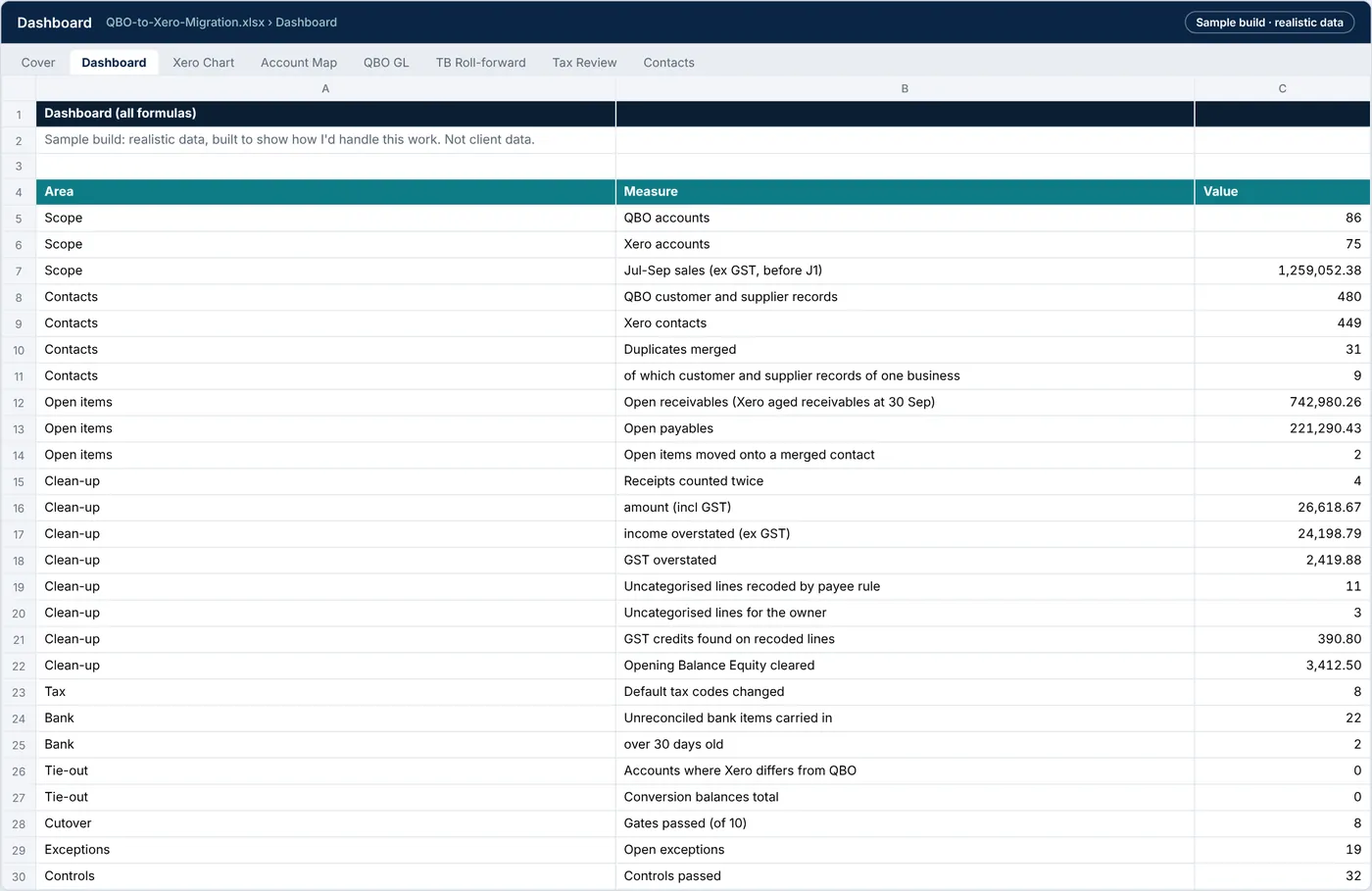
Exhibit 8: Dashboard tab: accounts, contacts, open items, clean-up findings, bank items, tie-out and gates, every figure a formula
Source: sample files
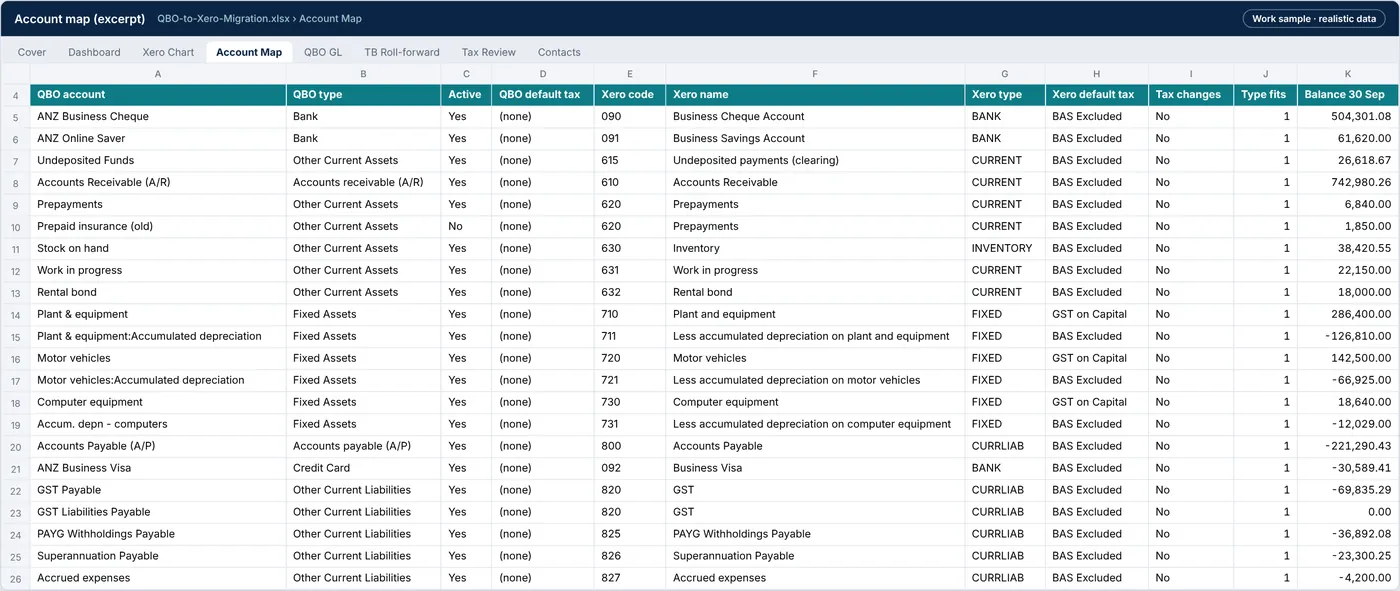
Exhibit 9: Account Map tab: each QBO account with its Xero code, the rule that mapped it, a type check and its balance
Source: sample files

Exhibit 10: Undeposited Funds tab: receipts never grouped into a deposit, matched to bank-feed income of the same customer and amount
Source: sample files
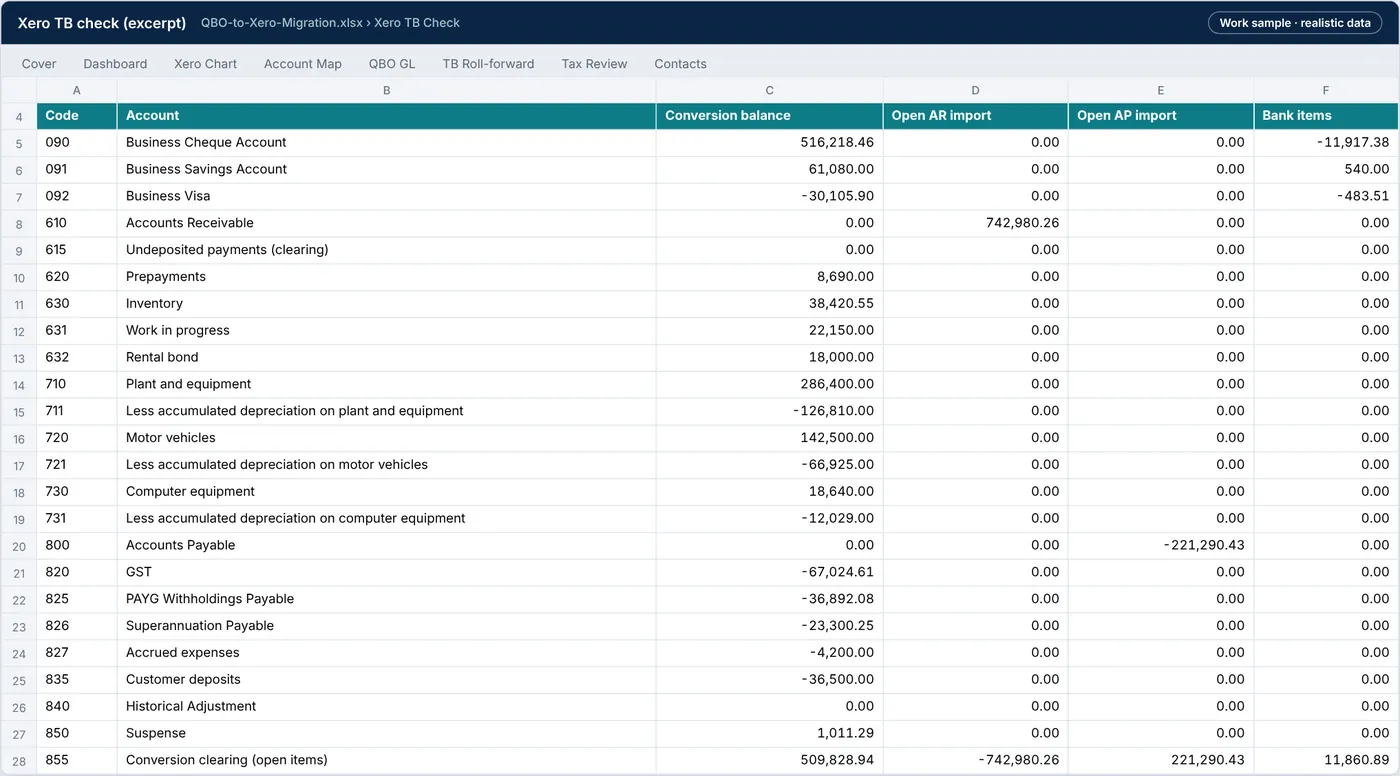
Exhibit 11: Xero TB Check tab: the adjusted QBO balance against Xero rebuilt from the import files, account by account, with the difference
Source: sample files
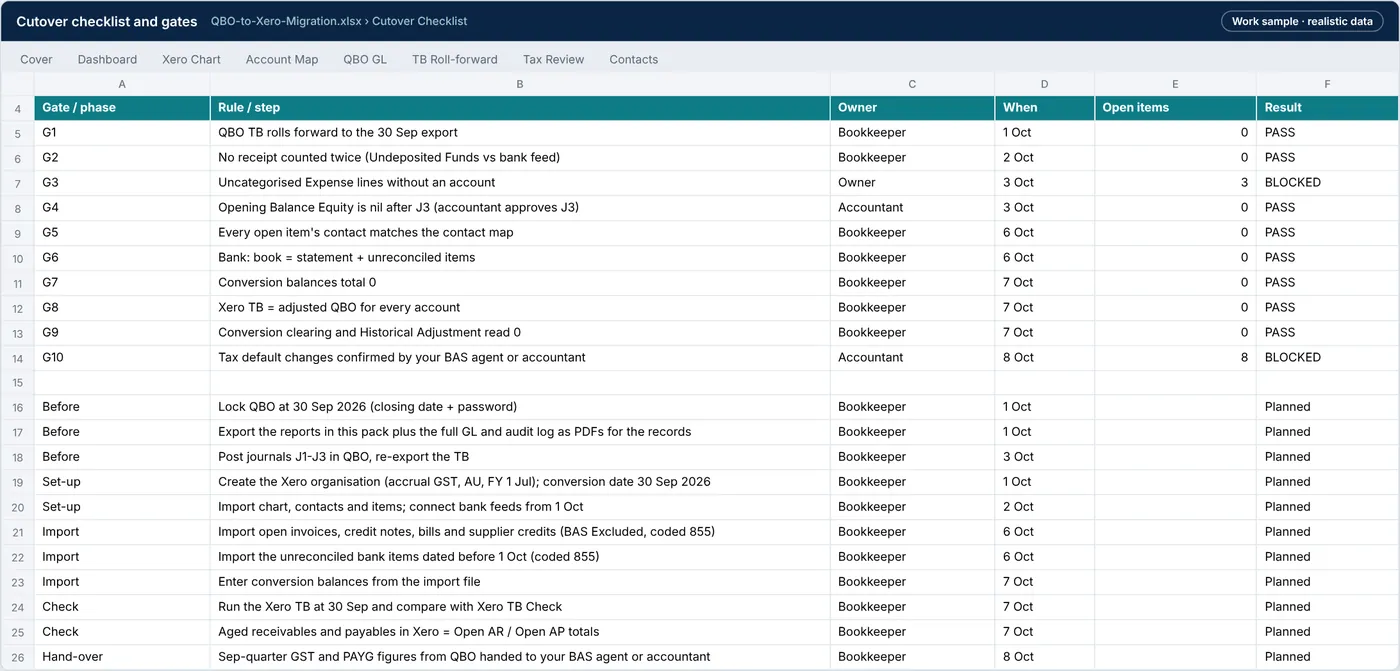
Exhibit 12: Cutover Checklist tab: ten go-live gates and the steps from locking QBO to the first Xero month end
Source: sample files
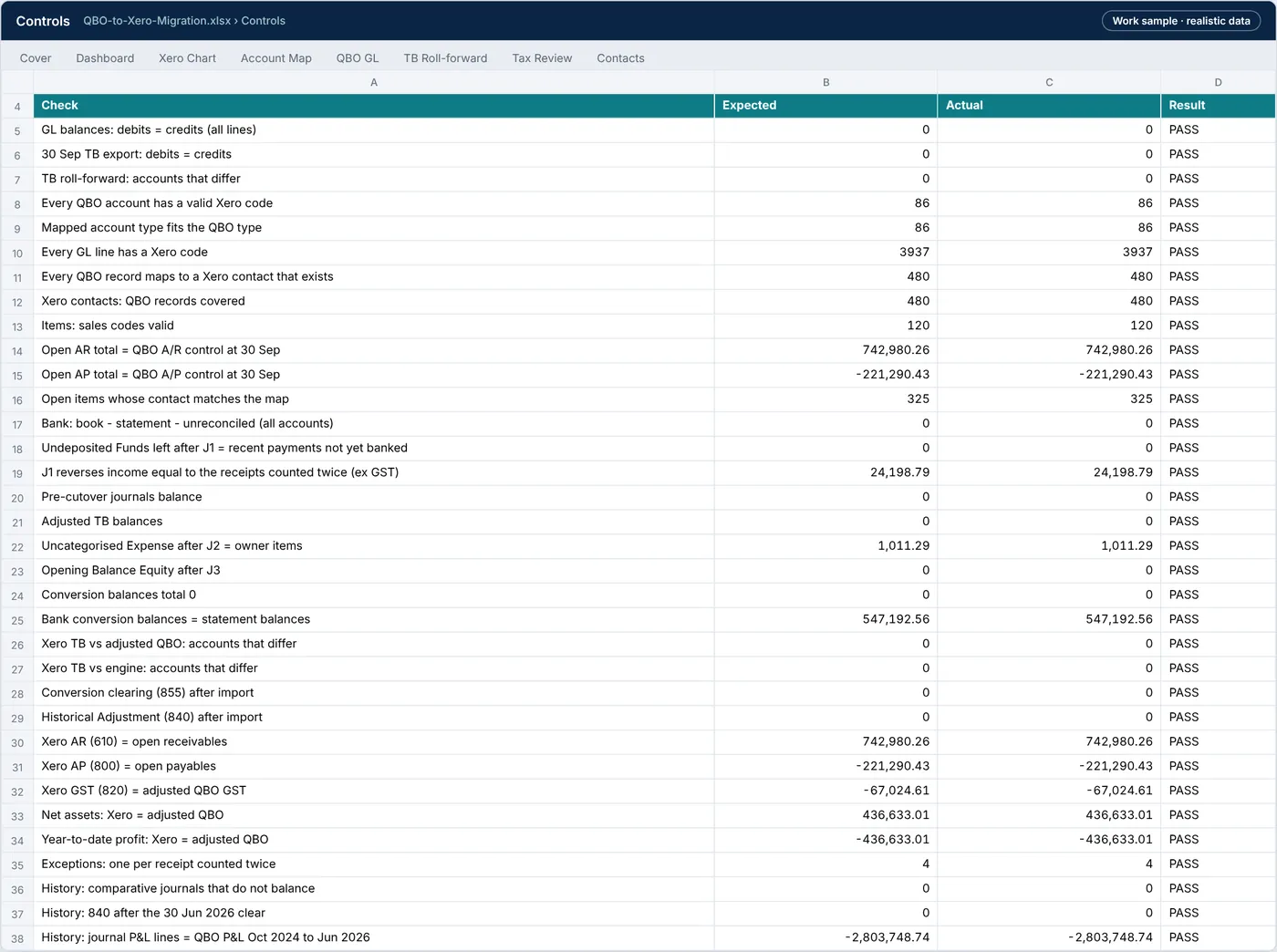
Exhibit 13: Controls tab: 32 formula controls, all PASS
Source: sample files
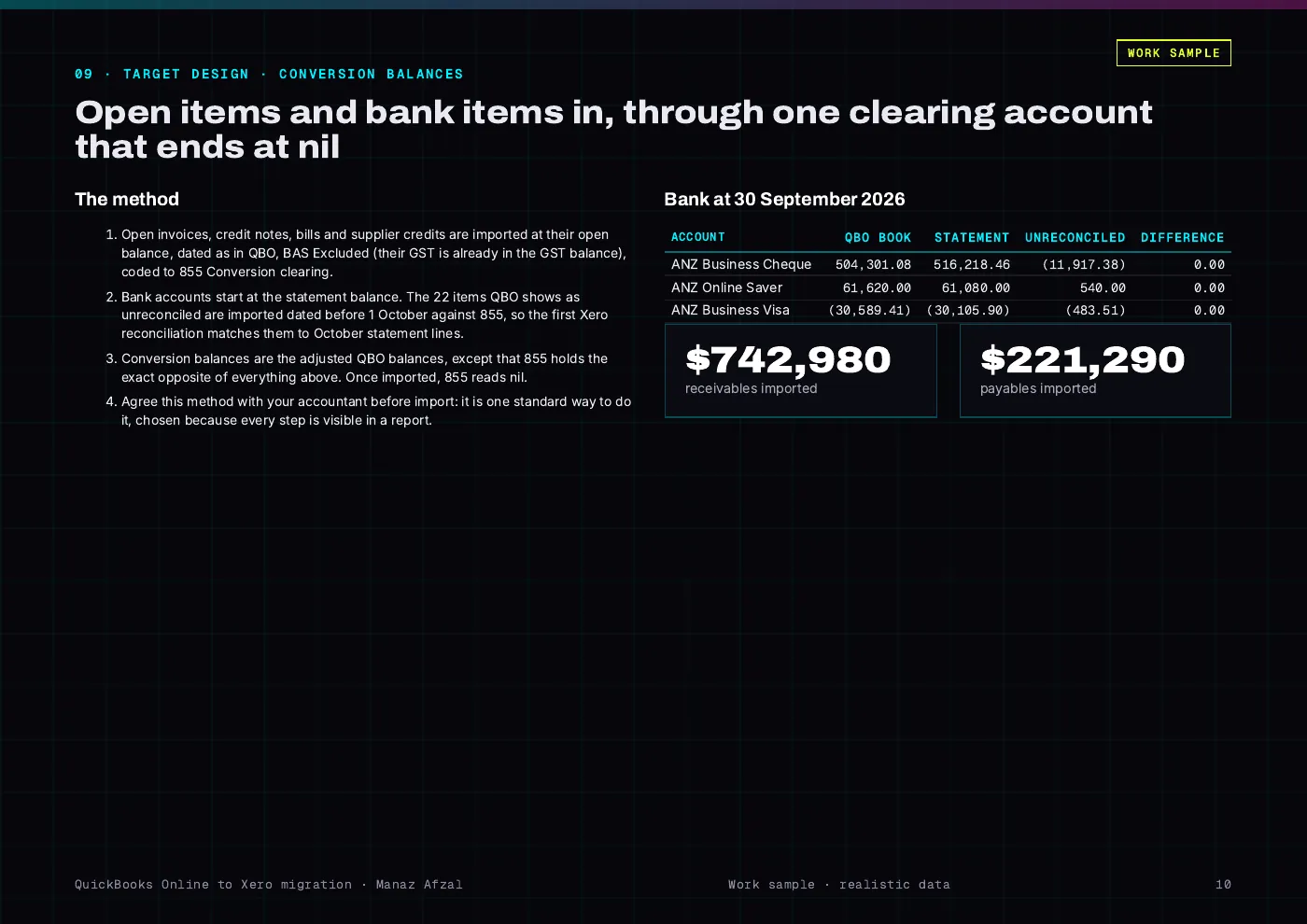
Exhibit 14: Report page: the conversion method, with open items and bank items through a clearing account that ends at nil
Source: sample files
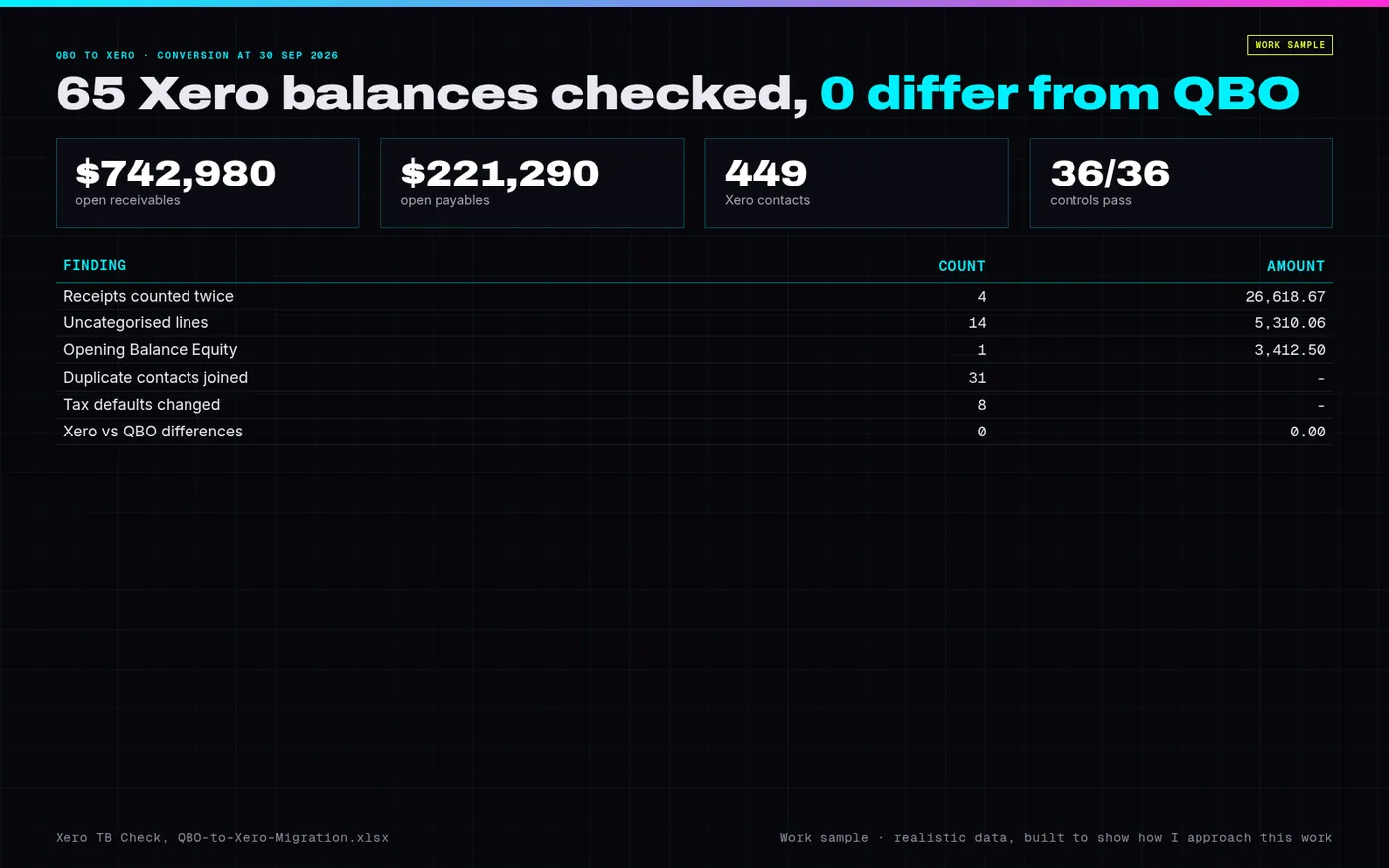
Exhibit 15: Overview of the QBO to Xero sample build: Xero balances checked against QBO, open receivables and payables, contacts and the clean-up findings
Source: sample files
B. Downloadable files
| File | What it is | Size |
|---|---|---|
| QBO-to-Xero-Migration.xlsx | Workbook: data profile, QBO GL, TB roll-forward, account map, Xero chart, tax review, contacts, items, open AR and AP, bank rec, Undeposited Funds, Uncategorised, clean-up journals, adjusted TB, conversion balances, Xero TB check, cutover checklist, exceptions, controls and test log | 398.9 KB |
| QBO-to-Xero-Report.pdf | Report (16 pages): data profile, findings, options, chart and contact mapping, clean-up journals, conversion method, tie-out, gates, controls, tests, risks | 672.2 KB |
| Executive-Summary.pdf | One-page executive summary | 135.4 KB |
| engine.py | Engine: account and tax mapping, contact matching, Undeposited Funds and Uncategorised finders, journals, Xero import files, simulated Xero TB and the regression test | 27.3 KB |
| QBO-to-Xero-data-and-code.zip | Inputs as exported from QBO (CSV), engine output, the nine Xero import files, and the scripts that rebuild the workbook and the report | 182.6 KB |
Sample build: realistic data, built to show how I'd handle this work. Names are placeholders and no client data is used.
Have a similar problem in your business?
Hire me on Upwork (opens in a new tab)