Work sample 02 / 15CRM, Field Service & Support
ServiceM8 set-up for a trades business, built from its own job history and connected to Xero
How I move a plumbing, electrical or HVAC business off a shared job sheet and typed invoices into ServiceM8, with Xero kept as the books.
- Area
- CRM, Field Service & Support
- Tools
- ServiceM8 · Xero · Google Sheets
- Typical scope
- US$2,000–3,500
- Timeline
- About 6 weeks · 4 fixed milestones
Work sample: realistic data, built to show how I approach this kind of project. Not a past client job.
01The problem
Many trades businesses grow on a shared spreadsheet job sheet, paper notes from the van and invoices typed into Xero from those notes. It works until the office is the bottleneck: jobs get finished but not invoiced, after-hours work goes out at the standard rate, and recurring compliance work lives in someone's head.
ServiceM8 fixes the workflow only if it is set up from the business's real history: real clients, real job types, a pricebook that reflects current supplier costs, and recurring jobs for anything that comes back every year.
Owners usually notice it as
- The same client appears several times across the job sheet and Xero
- Office staff retype invoices from handwritten notes
- Recurring work (backflow tests, servicing) is tracked on paper
- Prices have not been checked against the latest supplier price file
02Scope
A fixed scope agreed in writing before anything is built. The table shows what a project like this usually covers and what it leaves out.
| Area | Included |
|---|---|
| Client list | Client records from Xero and the job sheet matched into one list, with job sites under their billing client |
| Job history | 12 months of jobs categorised by rule into job templates; anything unclear goes to a review list |
| Billing check | Done jobs compared with Xero invoices at the business's own rates; findings go to the owner |
| Pricebook | Re-costed from the current supplier file with margin floors, discontinued and duplicate items listed |
| ServiceM8 set-up | Templates, forms, statuses, staff, recurring jobs and the Xero connection, then import files for clients, materials and open jobs |
| Not included | Payroll, STP and BAS lodgement |
Typical volumes for a business of this size. The sample files are sized as described in section 05.
| Milestone | Deliverable | Timing | Share | Weeks 1–6 |
|---|---|---|---|---|
| M1 Exports and findings | Client matching, billing check, findings list for the owner | Week 1 | 25% | |
| M2 Design | Templates, forms, statuses and pricebook agreed | Week 2 | 25% | |
| M3 Import and test | Imports loaded, a test job run end to end into a Xero draft | Week 3 | 30% | |
| M4 Go-live support | First-month weekly invoice check, SOPs, walkthrough | Weeks 4–6 | 20% |
Typical scope for this kind of project: US$2,000–3,500
About 6 weeks across 4 fixed milestones. The fixed quote follows a US$300 Systems Health Check, which confirms the volumes and the scope first. Your software subscriptions are billed to you by the vendors.
03How I approach it
Construction drawing. Each stage has its own check before the next one starts.
- 01
Match clients before anything else
One client list is the base for everything. I match across Xero and the job sheet with clear rules and keep a list of every merge so it can be reversed.
- 02
Let the history design the templates
Job templates come from what the business actually does, counted from 12 months of jobs, not from a generic list.
- 03
Check the money before go-live
A billing check on the last 12 months shows where jobs were missed or under-charged. The owner decides what to do; I do not contact clients.
- 04
Re-cost the pricebook
Every material line is checked against the current supplier file and a margin floor; changes are proposed, not applied.
- 05
Gate the go-live
Ten go-live gates, each one a test that must pass before bookings move to ServiceM8.
04Checks
Nothing goes live on trust. These checks run before sign-off and stay in the files, so they can be re-run after every change.
- Every client record maps to exactly one client
- Every job and recurring device belongs to a client that exists
- Expected amount for each done job recomputed from the rate card
- No pricebook item below its margin floor without a decision
- A test job goes from booking to a Xero draft invoice with the right items
| Check | What it catches | Status |
|---|---|---|
| Every customer record maps to a customer that exists | No orphan records after matching | PASS |
| Customer records counted on the Clients tab | Each record lands on exactly one customer | PASS |
| Every job's customer exists | Jobs load against a real customer | PASS |
| Every backflow device's customer exists | Devices load against a real customer | PASS |
| Job sites counted on the Clients tab | Every agency site sits under its billing customer | PASS |
| Every job has a category or is marked for review | Nothing falls between the rules | PASS |
| Category rule counts = jobs | Rules table is complete | PASS |
| Templates cover every categorised job | Every categorised job has one template | PASS |
| Every done job is on the Billing Check | Billing check is complete | PASS |
| Every invoice is on the Billing Check once | No invoice unexplained or counted twice | PASS |
Show all 32 checks
| Check | What it catches | Status |
|---|---|---|
| OK jobs: invoice = expected amount | The rate rule reproduces the office's billing | PASS |
| Invoiced on Billing Check = Xero invoice total | Ties to Xero | PASS |
| Gap (formula) = engine gap | Workbook and engine agree | PASS |
| Not invoiced rows have no invoice | Status is consistent | PASS |
| After-hours flags only on after-hours jobs | Status is consistent | PASS |
| Pricebook status (formula) = engine status | Workbook and engine agree | PASS |
| Every coded item is in the supplier file | New costs come from the price file | PASS |
| Materials import has no duplicate code | Clean pricebook | PASS |
| Materials import lines all in the pricebook | No orphan or removed items | PASS |
| Materials import = kept pricebook rows + 4 labour and call-out items | Nothing dropped | PASS |
| Margin review rows = items below floor | Every low-margin item reaches the owner | PASS |
| Proposed prices meet the floor | Proposed prices fix the margin | PASS |
| Backflow: devices on recurring jobs = register | Every device is tested | PASS |
| Recurring job device counts match the register | Right test fee and time per site | PASS |
| Recurring jobs assigned to accredited testers | Only accredited staff test devices | PASS |
| Overdue devices booked within two weeks of go-live | Overdue tests are caught up first | PASS |
| Every template has a form | Checklists on every job | PASS |
| Every template has staff who hold its licence | Jobs can be assigned | PASS |
| Open jobs: customer exists | Open jobs import | PASS |
| Status map covers every job-sheet status | No status left unmapped | PASS |
| Exceptions: one per billing finding | Every finding is on the register | PASS |
| Engine regression: false customer merges | Different customers never merged | PASS |
Status read from the sample workbook. Each check is a formula, not a typed value.
05Handover
Everything is handed over in editable files you own, with the steps written down so your team is not dependent on me.
In this work sample
A plumbing and gas business: 9,200 jobs, 7,909 Xero invoices and 11,230 client records matched to 1,768 clients, in a 28-tab workbook with 68,568 formulas and 32 controls.
- ServiceM8 account set up with templates, forms, statuses and recurring jobs
- Import files and the workbook behind them
- Three SOPs: booking, on site to invoice, recurring jobs
- A weekly check that every completed job has a draft invoice
- A recorded walkthrough for the office
06Files in this work sample
Screens from the sample files. Select one to open it full size.
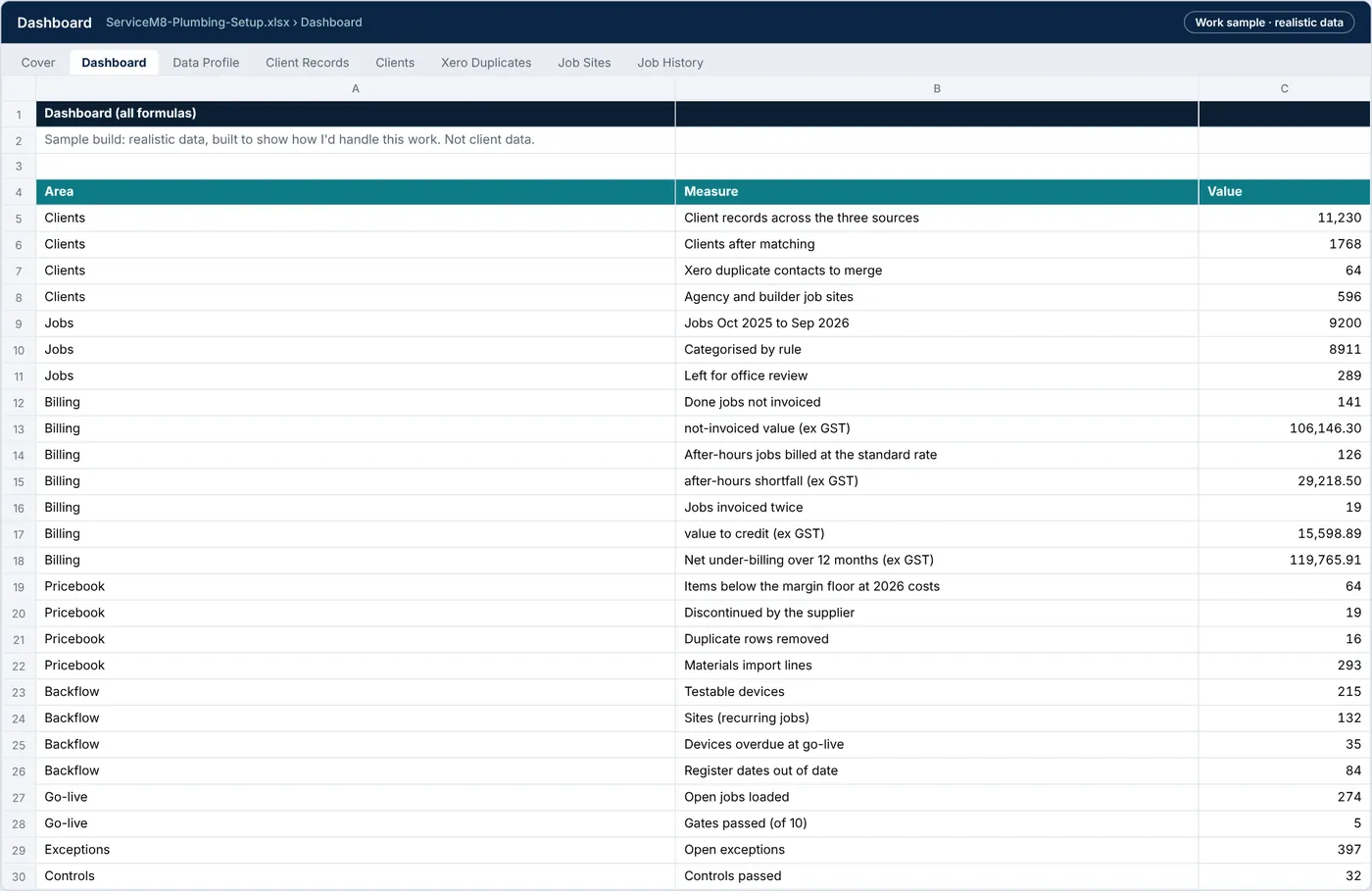
ServiceM8-Plumbing-Setup.xlsx › Dashboard
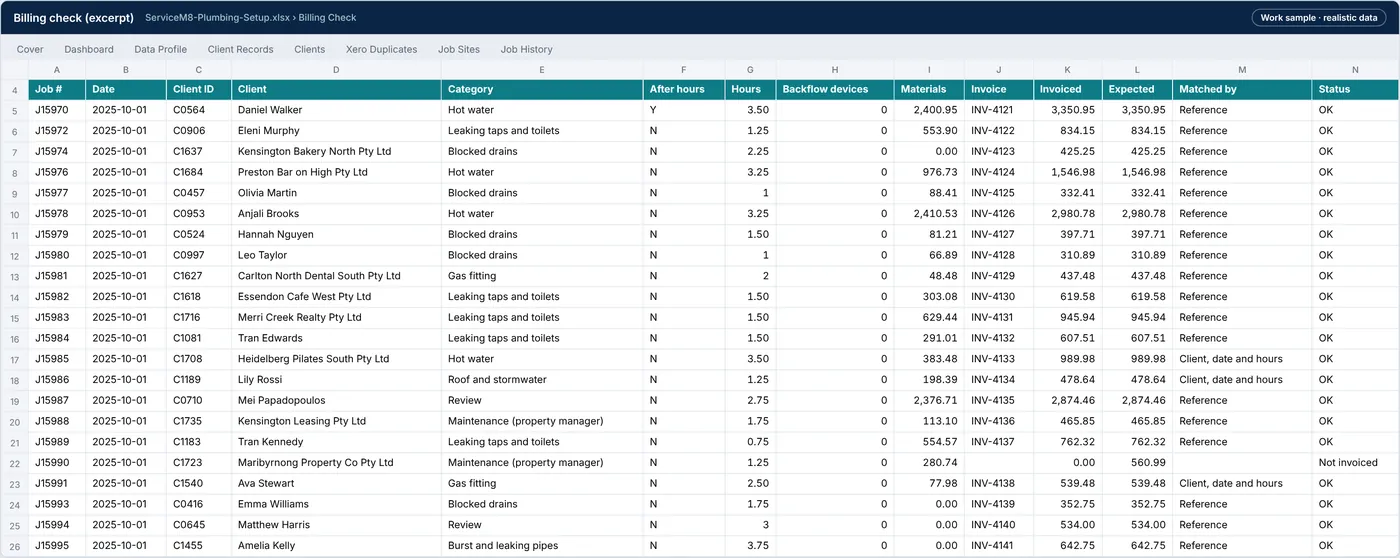
ServiceM8-Plumbing-Setup.xlsx › Billing check
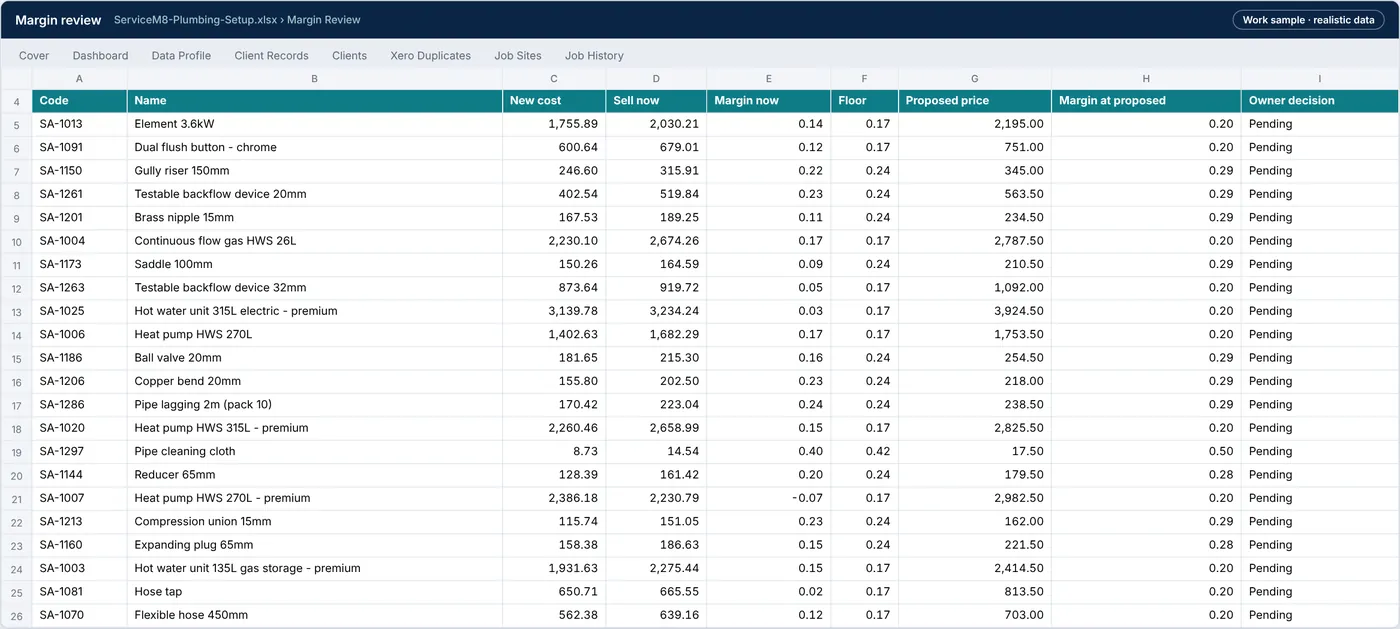
ServiceM8-Plumbing-Setup.xlsx › Margin review
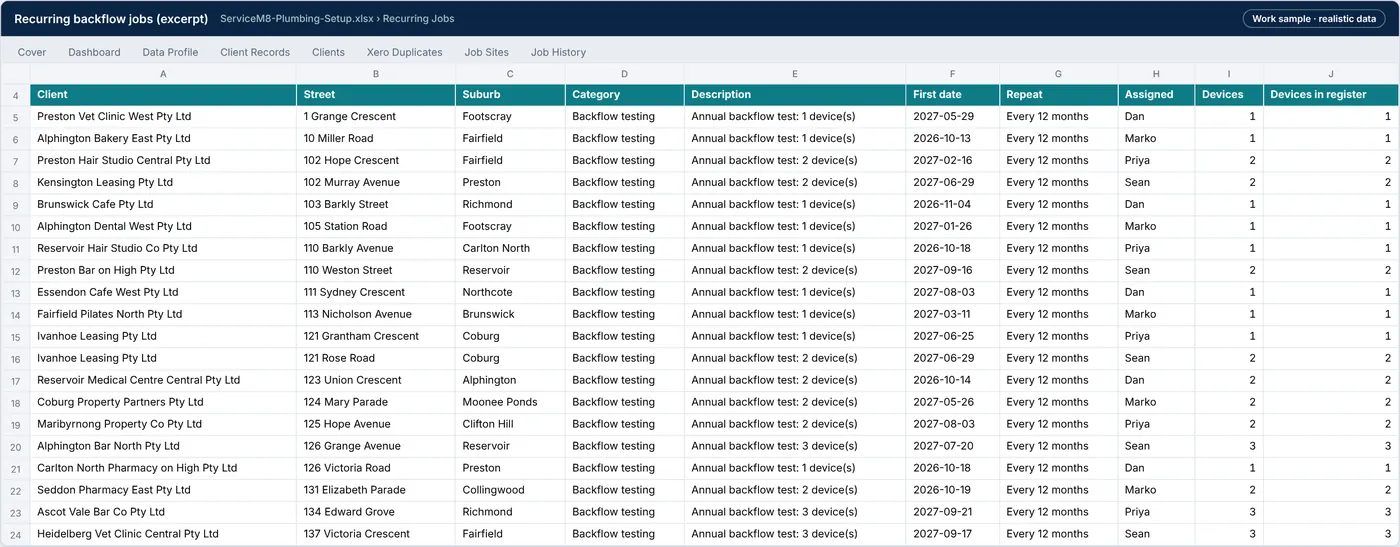
ServiceM8-Plumbing-Setup.xlsx › Recurring jobs
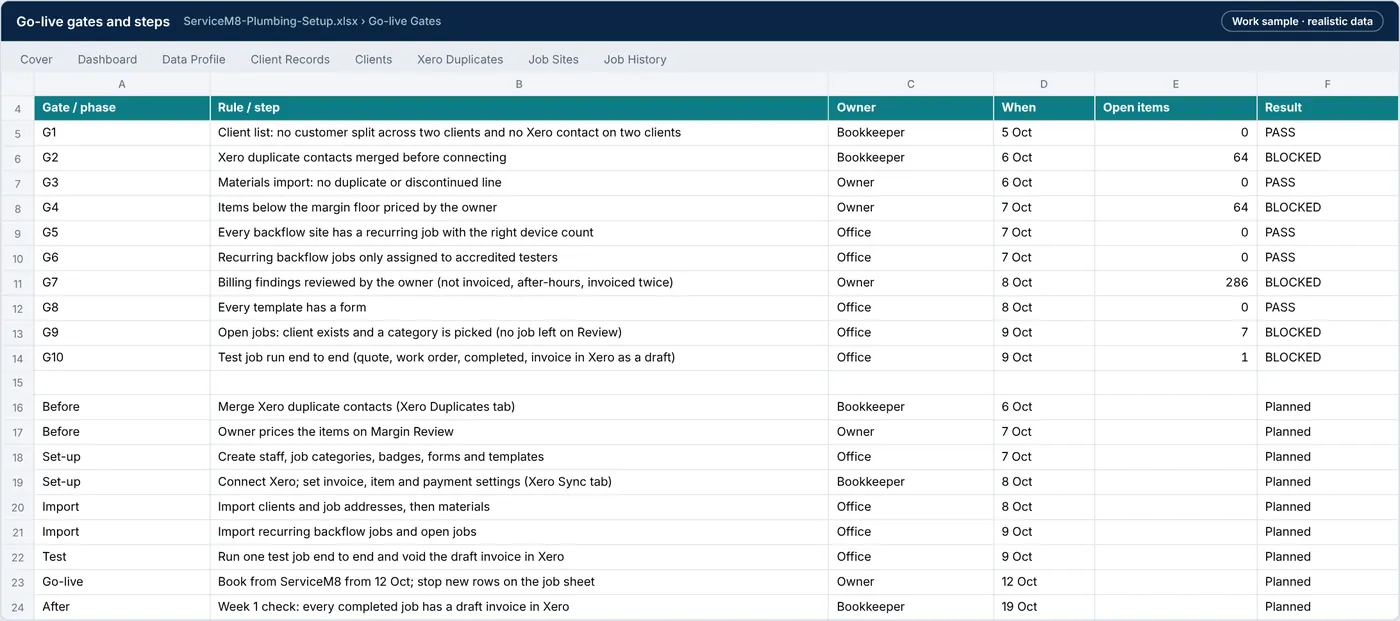
ServiceM8-Plumbing-Setup.xlsx › Gates
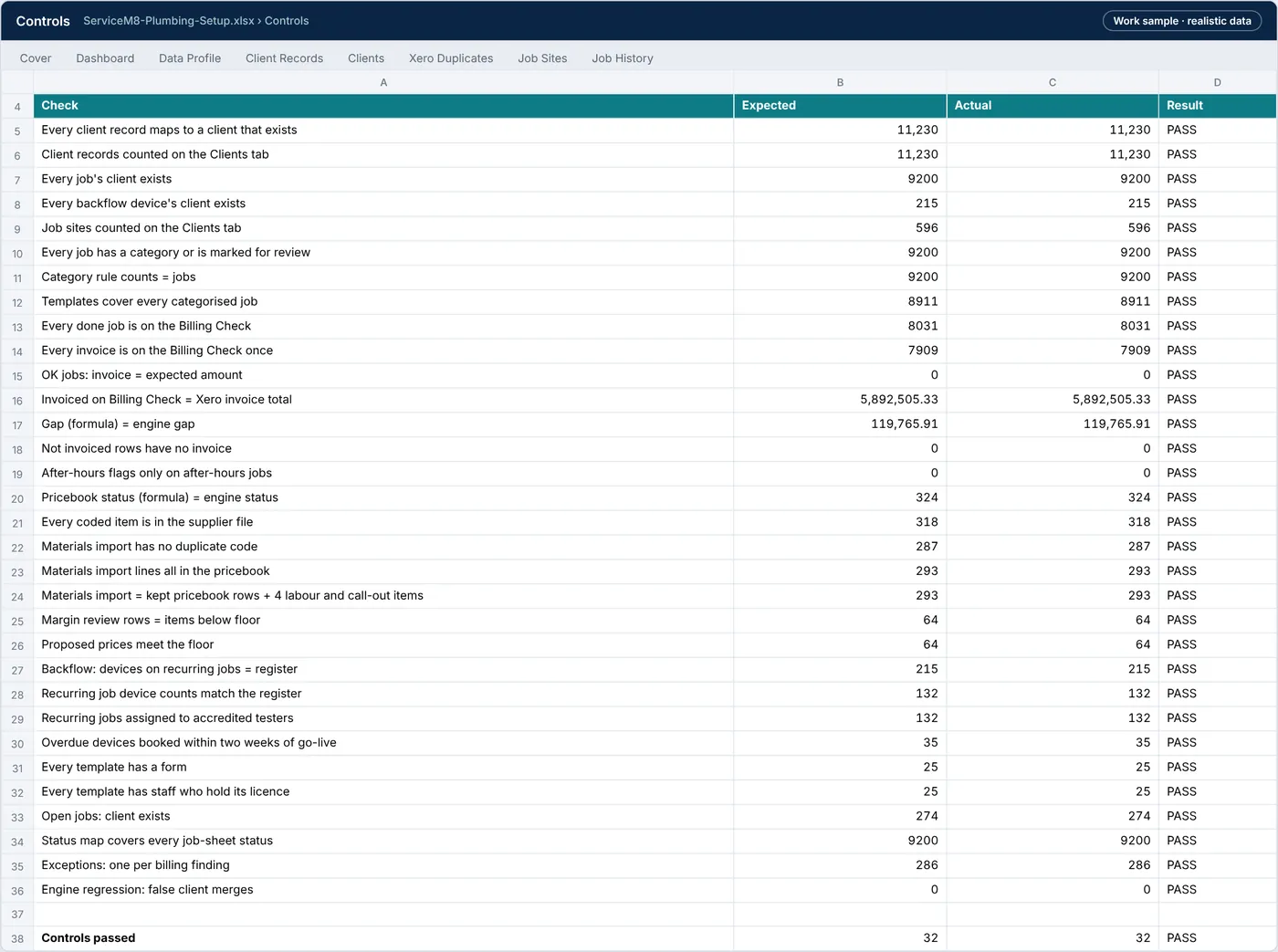
ServiceM8-Plumbing-Setup.xlsx › Controls
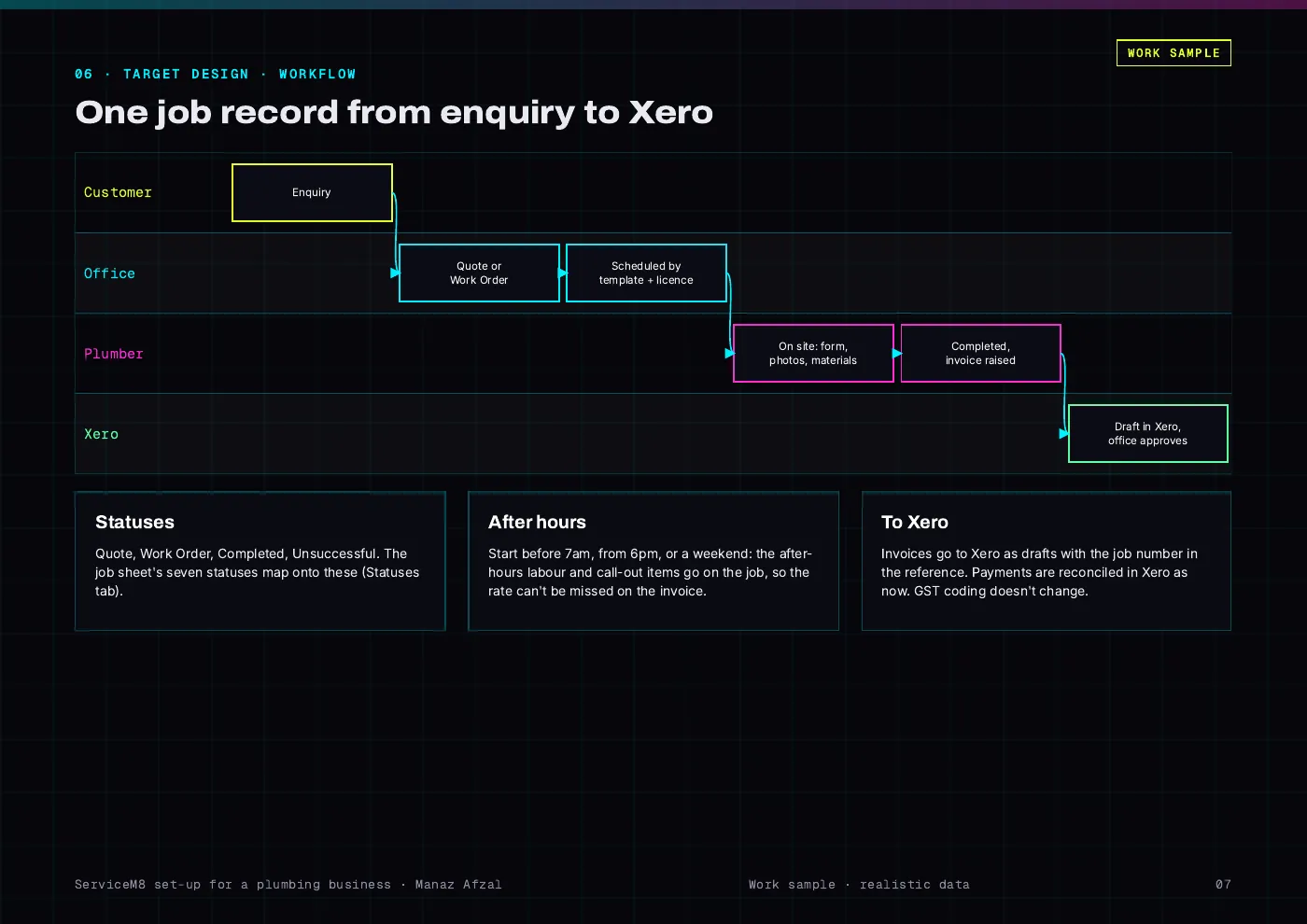
ServiceM8-Setup-Report.pdf · page 7
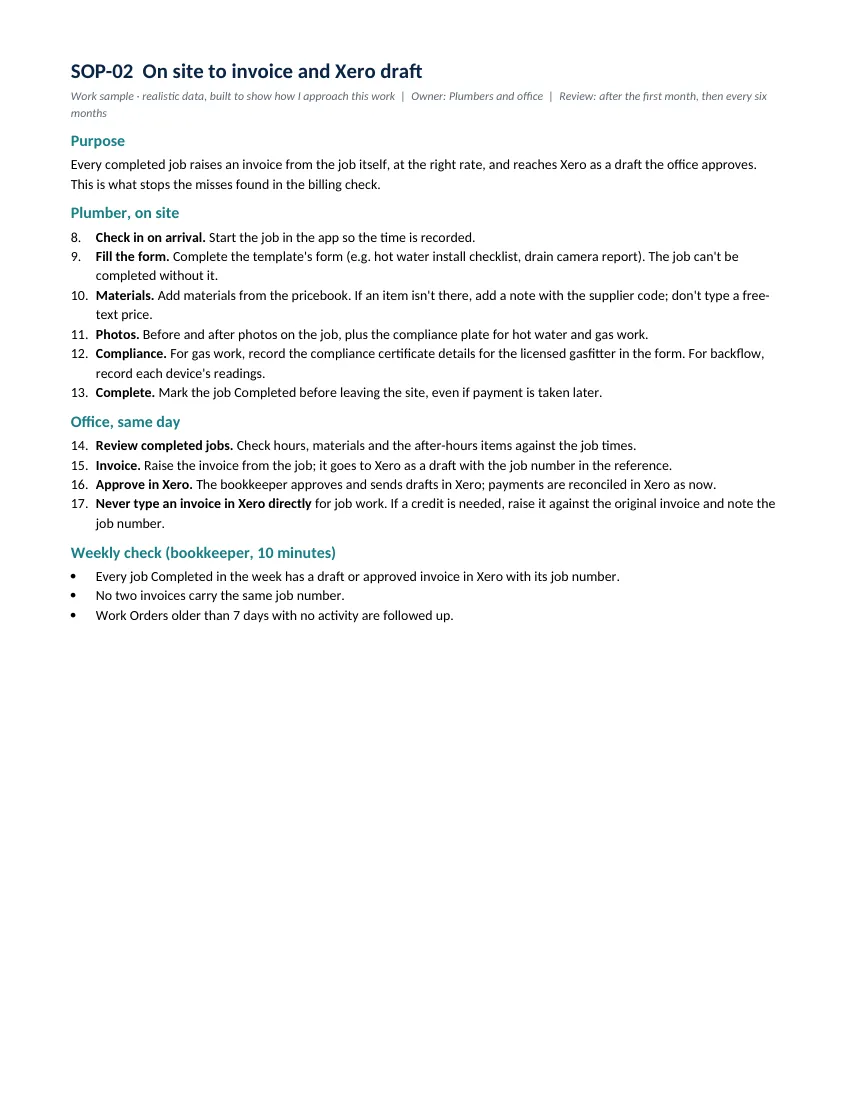
ServiceM8-Setup-Report.pdf
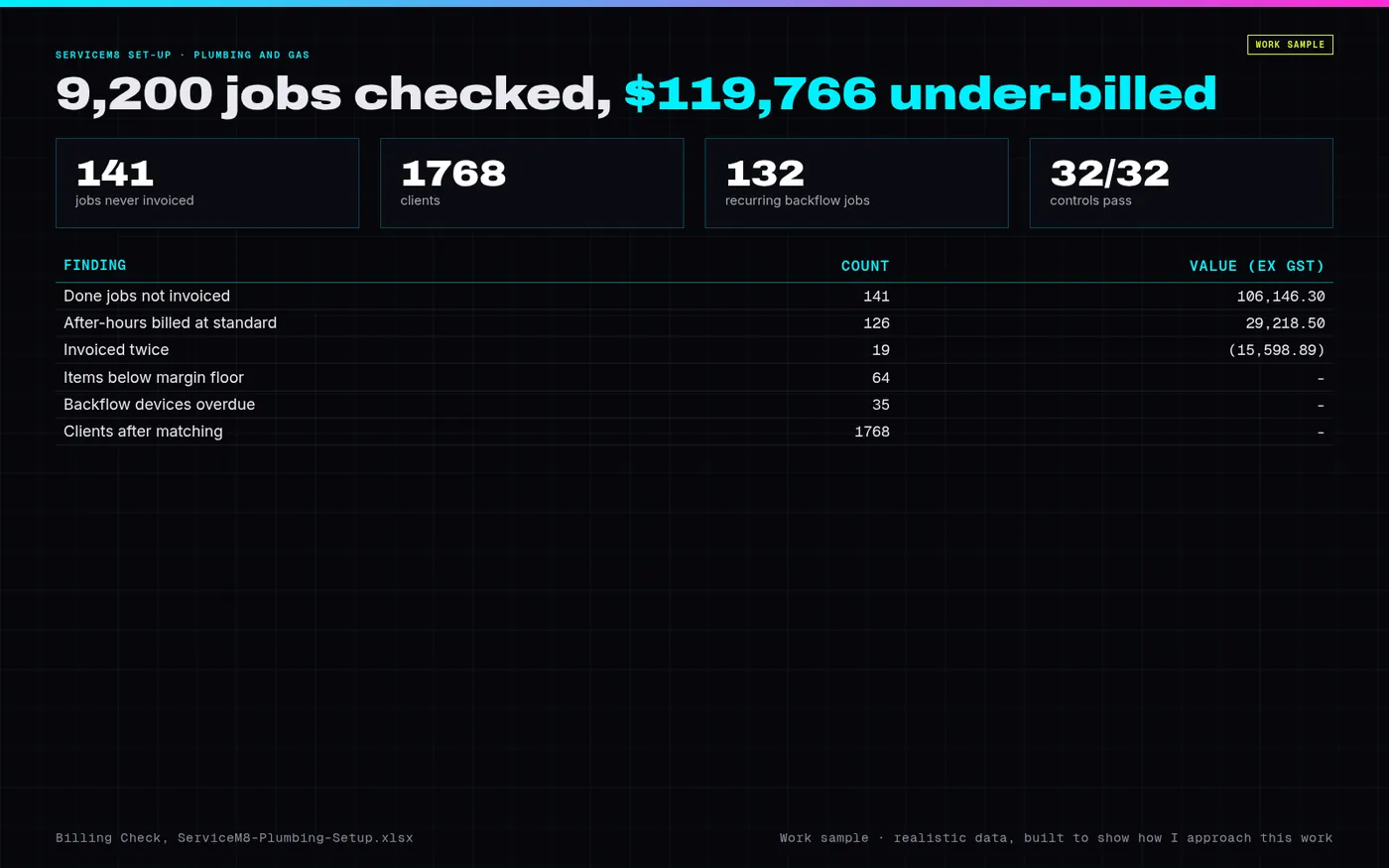
PREVIEW.png · one-page overview
| File | What it is | Size |
|---|---|---|
| ServiceM8-Plumbing-Setup.xlsx | Workbook: data profile, customer matching, Xero duplicates, job sites, job history and category rules, rates, billing check, price file, pricebook and margin review, materials import, backflow register, recurring jobs, templates, staff, forms, statuses, open jobs, Xero sync, go-live gates, exceptions, controls and test log | 3 MB |
| ServiceM8-Setup-Report.pdf | Report (17 pages): scope, current state, findings, options, workflow, customers, templates, pricebook, backflow, billing check, gates, controls, tests, risks | 704.3 KB |
| Executive-Summary.pdf | One-page executive summary | 138.5 KB |
| ServiceM8-SOPs.pdf | Three SOPs: enquiry to booked job, on site to invoice and Xero draft, recurring backflow testing (PDF) | 69 KB |
| ServiceM8-SOPs.docx | The three SOPs, editable Word file | 38.2 KB |
| engine.py | Engine: customer matching, job categories, billing check, pricebook re-costing, backflow schedule, import files and the regression test | 27.3 KB |
| ServiceM8-Setup-data-and-code.zip | Inputs as exported (CSV), engine output, the four ServiceM8 import files, and the scripts that rebuild the workbook, report and SOPs | 1.3 MB |
Tell me what’s bugging you and I’ll tell you where I’d look first.
Send a short note on Upwork about what is slowing the business down. I’ll reply with where I’d start, and whether the US$300 Systems Health Check is the right first step.