CASE FILE 08/13CLASS: SAMPLE BUILDDATA: REALISTIC, NOT CLIENTTYPE: Ops systems & SOPs
Sample build: realistic data, built to show how I'd handle this work. Not client work.
Sample buildOps systems & SOPs
Field-service SOP pack and Jobber setup map
A 10-step request-to-paid workflow mapped into Jobber and written up as 3 SOPs
- 9job types priced
- 10workflow steps
- 10automations listed
- 3SOPs written
01Summary
- How work flows from request to paid invoice is written down as a 10-step workflow and mapped into Jobber.
- 9 job types are priced, 10 automations listed with an honest status, and 3 SOPs written.
- Subcontractor compliance (5) and commercial bids (4) move out of scattered notes into trackers.
9 job types are priced, 10 automations listed with an honest status, and 3 SOPs written.
Key point, computed from the sample files
02The scenario
In this scenario quotes, visits and invoices are handled differently depending on who picks up the phone. New staff learn by shadowing. Subcontractor insurance dates and commercial bids are tracked in scattered notes.
Source: sample files
03Issues in the data
Source: sample files
04How I approached it
- 9 job types with pricing units, ready to enter in Jobber.
- A 10-step workflow from request to paid invoice, with the owner and the Jobber screen for each step.
- An automations checklist (10 items) with a status for each, so nothing is assumed to be switched on.
- A subcontractor compliance tracker (5 placeholder subcontractors and vendors) and a commercial bid tracker (4 placeholder accounts).
- 3 SOPs written in plain steps, supplied as an editable Word file and a 2-page PDF.
Source: my design and the sample files
05How this applies to your business
- Assess and designMap the current process, size the gaps from your own data, agree the design and a written scope.
- Build and testBuild in your own tools with the checks built in, then run real cases end to end.
- Document and hand overSOPs, a walkthrough and a handover, so your team runs it without me.
| Activity | Business owner | Specialist (me) | Your team |
|---|---|---|---|
| Approve prices and job types | A | C | R |
| Write the SOPs | A | R | C |
| Switch on automations | A | R | C |
| Follow the SOPs daily | I | I | R |
Source: sample plan
06Controls and checks
| Check | What it catches | Status |
|---|---|---|
| Request form auto-acknowledgement | Jobber > Requests · Built-in | Done |
| Assessment reminder (24h) | Jobber > Assessments · Built-in | Done |
| Quote follow-up day 2 and day 5 | Jobber > Quotes · Built-in | Done |
| Visit reminder 24h + on-my-way text | Jobber > Visits · Built-in | Review |
| Invoice reminders day 3, 7, 14 | Jobber > Invoices · Built-in | Review |
| Review request after paid invoice | Jobber > Marketing · Built-in / add-on | Pending |
| New Jobber client > Google Sheets client log | Zapier/Make webhook · Integration | Pending |
| Weather delay bulk-reschedule notice | Template + bulk SMS · Manual trigger | Draft |
| Sub COI expiry 30-day alert | Google Sheets + Apps Script · Apps Script | Draft |
| Commercial bid stage change > tracker update | Jobber quote status > Sheet · Integration | Pending |
Source: sample files (Checks / Controls tab, test output or run log)
07What the files show
- 9job types priced
- 10workflow steps
- 10automations listed
- 3SOPs written
Source: sample files, measured by script. Sample data, not a client result.
- Automation status is tracked per item: 3 done, 2 review, 3 pending, 2 draft.
- Every workflow step names an owner and where it happens in Jobber.
- The SOP PDF and the Word file come from the same source, so they match.
08Risks and how the build handles them
| Risk | Mitigation built in |
|---|---|
| An automation is assumed to be on | Checklist status per automation: Done, Review, Pending, Draft |
| Insurance lapses unnoticed | Sub compliance tracker with a 30-day expiry alert (listed in the checklist as Draft) |
| SOPs drift from practice | Every workflow step names an owner and the Jobber screen where it happens |
Source: sample design
09Appendix: files
A. Screenshots of the deliverable
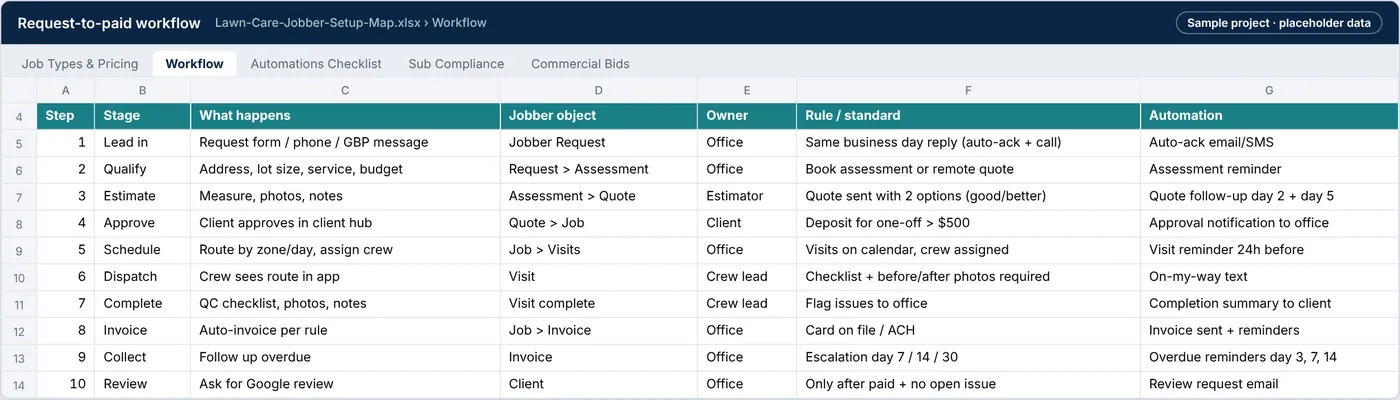
Exhibit 8: Workflow tab: each stage from request to paid invoice with owner, Jobber screen and trigger
Source: sample files
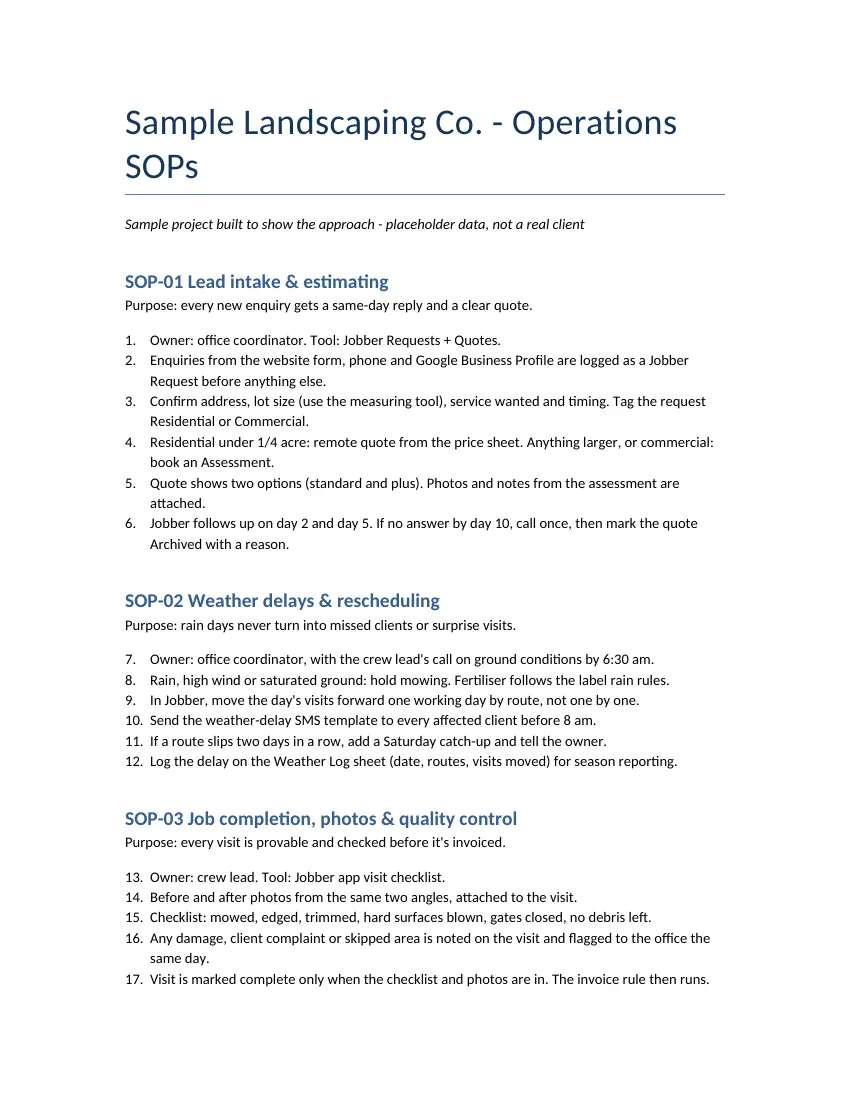
Exhibit 9: First page of the SOP pack for Sample Landscaping Co.
Source: sample files
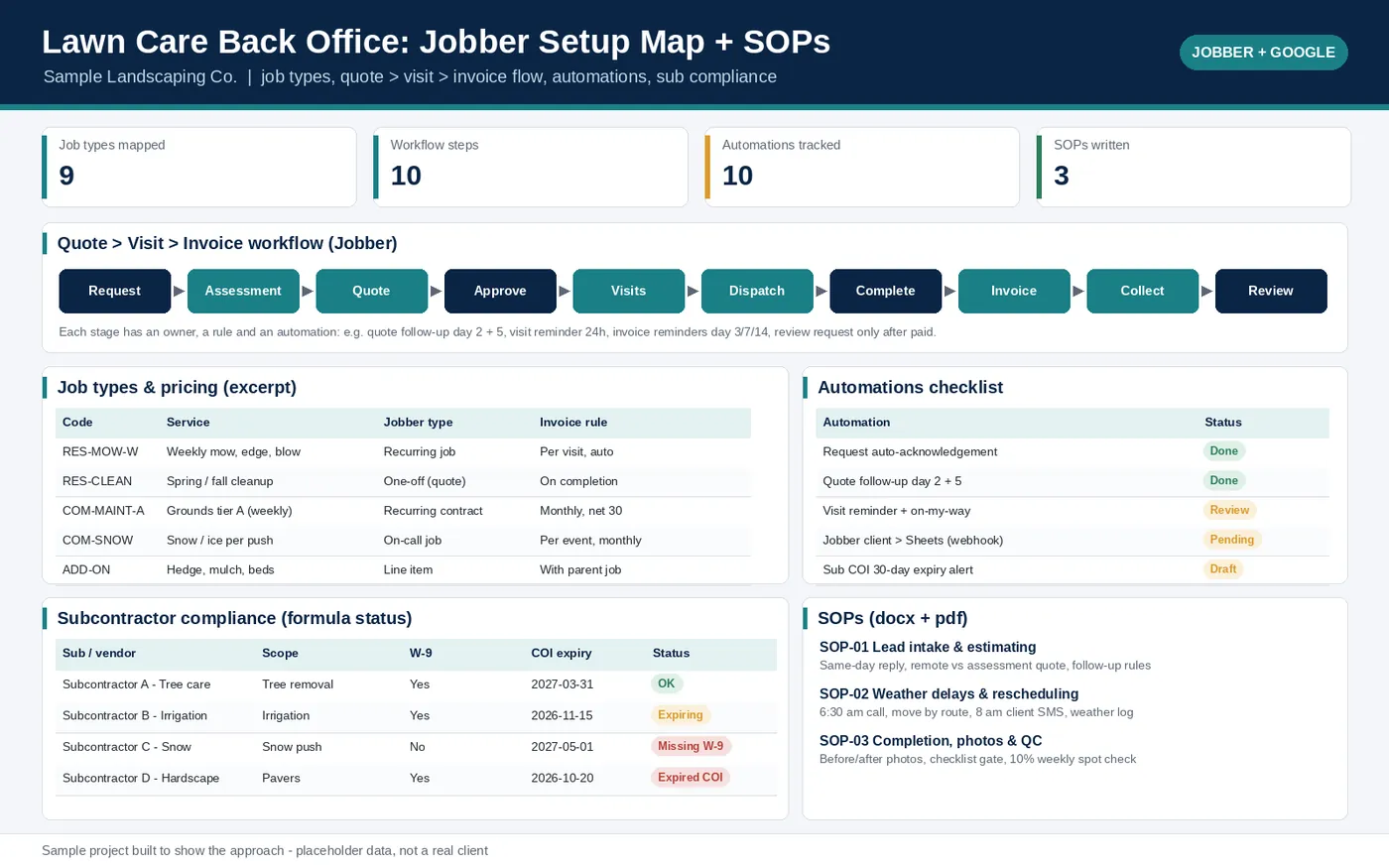
Exhibit 10: Overview of the lawn care Jobber setup sample: job types with pricing, the request-to-paid workflow and automation checklist
Source: sample files
B. Downloadable files
| File | What it is | Size |
|---|---|---|
| Lawn-Care-Jobber-Setup-Map.xlsx | Jobber setup map: job types and pricing, workflow, automations checklist, subcontractor compliance, commercial bids | 12 KB |
| Lawn-Care-SOPs.pdf | SOP pack (PDF) | 48.3 KB |
| Lawn-Care-SOPs.docx | SOP pack (editable Word) | 36.9 KB |
Sample build: realistic data, built to show how I'd handle this work. Names are placeholders and no client data is used.
Have a similar problem in your business?
Hire me on Upwork (opens in a new tab)