CASE FILE 07/13CLASS: SAMPLE BUILDDATA: REALISTIC, NOT CLIENTTYPE: Spreadsheet systems
Sample build: realistic data, built to show how I'd handle this work. Not client work.
Sample buildSpreadsheet systems
Assessment survey scoring and results in Google Sheets
15 survey questions scored into Google Sheets, with incomplete responses caught before they count
- 15questions scored
- 10test responses
- 4check-ins compared to baseline
- 1incomplete response caught
01Summary
- A 15-question assessment across 5 domains is scored in Google Sheets, including reverse-scored items.
- 10 test responses from 6 participants produce domain scores, gaps and a focus area.
- Check-ins are compared to baseline (4 so far) and 1 incomplete response is caught before it counts.
10 test responses from 6 participants produce domain scores, gaps and a focus area.
Key point, computed from the sample files
02The scenario
In this scenario scores are worked out by hand from a survey export. Reverse-worded questions are easy to score the wrong way, and incomplete responses slip through.
Source: sample files
03Issues in the data
Source: sample files
04How I approached it
- Scoring logic for 15 questions across 5 domains, with reverse-scored items marked.
- A modular survey flow (10 blocks) and a field map from survey fields to sheet columns.
- A results tab with domain scores, gaps against each person's priorities, a focus domain and the change since their baseline.
- An Apps Script web app (doPost) that writes one row per response.
Source: my design and the sample files
05How this applies to your business
- Assess and designMap the current process, size the gaps from your own data, agree the design and a written scope.
- Build and testBuild in your own tools with the checks built in, then run real cases end to end.
- Document and hand overSOPs, a walkthrough and a handover, so your team runs it without me.
| Activity | Business owner | Specialist (me) | Your team |
|---|---|---|---|
| Approve scoring rules | A | R | C |
| Build the sheet and receiver | A | R | I |
| Review QA flags | I | C | R |
| Use results with participants | A | I | R |
Source: sample plan
06Controls and checks
| Check | What it catches | Status |
|---|---|---|
| Every response has a QA result | Rows that skipped the check | 10 of 10 |
| Complete responses marked OK | False alarms | 9 OK |
| Incomplete responses flagged | Partial answers counted as complete | 1 flagged |
Source: sample files (Checks / Controls tab, test output or run log)
07What the files show
- 15questions scored
- 10test responses
- 4check-ins compared to baseline
- 1incomplete response caught
Source: sample files, measured by script. Sample data, not a client result.
- 10 responses from 6 placeholder participants run through the scoring.
- The QA column flags 1 response with a missing answer instead of scoring it as zero.
- 205 formulas, so the results can be audited cell by cell.
08Risks and how the build handles them
| Risk | Mitigation built in |
|---|---|
| Reverse items scored the wrong way | Scoring tab marks every reversed item; test responses check the result |
| Incomplete responses distort averages | QA column flags them |
| Waves mixed up | Wave field and participant ID drive the baseline lookup |
Source: sample design
09Appendix: files
A. Screenshots of the deliverable

Exhibit 8: Results tab: domain scores, gaps, focus domain, change since baseline and a QA flag on the incomplete response
Source: sample files
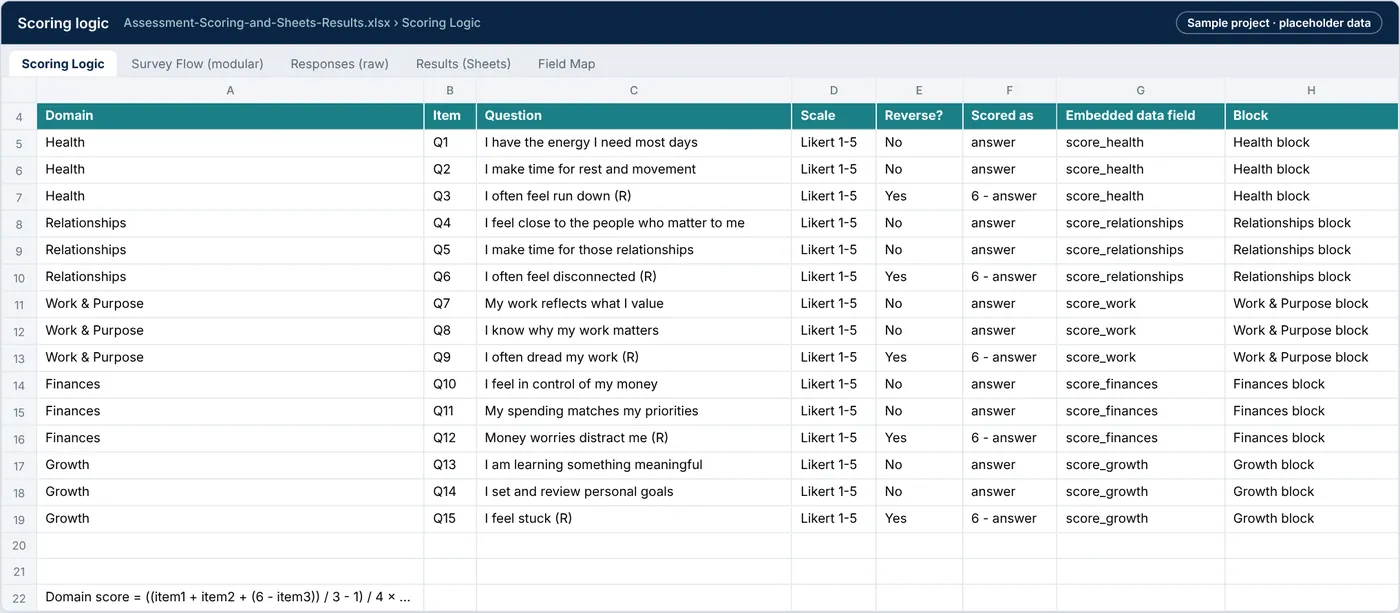
Exhibit 9: Scoring logic tab: 15 items across 5 domains with reverse-scored items marked
Source: sample files
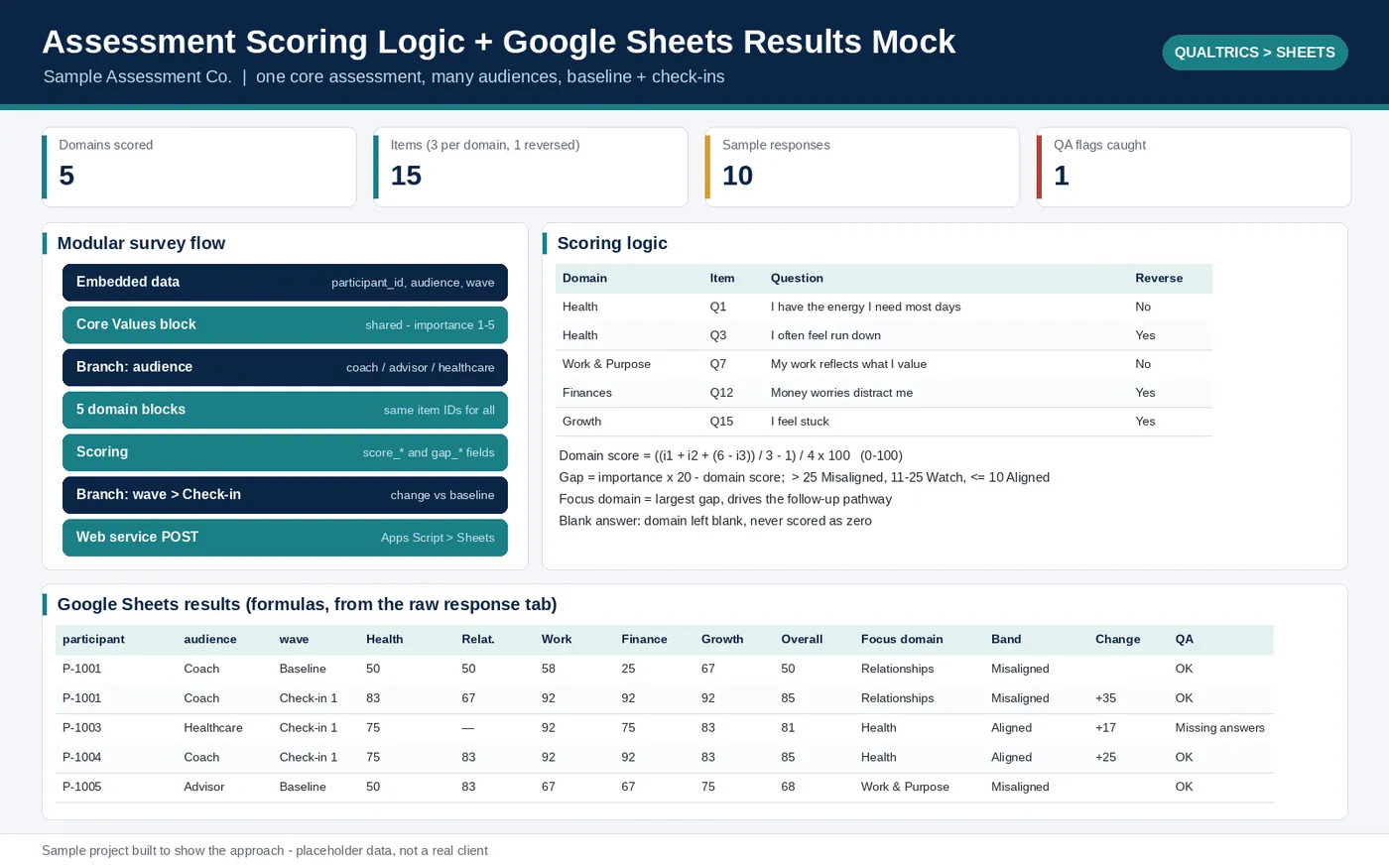
Exhibit 10: Overview of the survey-to-Sheets sample: scoring logic, survey flow and the results tab
Source: sample files
function doPost(e) {
  const lock = LockService.getScriptLock(); lock.waitLock(20000);
  try {
    const data = JSON.parse(e.postData.contents);
    const sh = SpreadsheetApp.getActive().getSheetByName(SHEET);
    const ids = sh.getRange(5, 1, Math.max(sh.getLastRow() - 4, 1), 1).getValues().flat();
    if (ids.indexOf(data.ResponseId) !== -1) return out({status: 'duplicate', id: data.ResponseId});
    const missing = FIELDS.filter(f => data[f] === undefined || data[f] === '');
    sh.appendRow(FIELDS.map(f => data[f] === undefined ? '' : data[f]));
    return out({status: missing.length ? 'saved_with_gaps' : 'saved', missing: missing});
  } finally { lock.releaseLock(); }
}
Source: apps-script-doPost.gs
B. Downloadable files
| File | What it is | Size |
|---|---|---|
| Assessment-Scoring-and-Sheets-Results.xlsx | Scoring logic, modular survey flow, raw responses, results tab and field map | 15.5 KB |
| apps-script-doPost.gs | Apps Script web app that receives each response and writes one row | 1.3 KB |
Sample build: realistic data, built to show how I'd handle this work. Names are placeholders and no client data is used.
Have a similar problem in your business?
Hire me on Upwork (opens in a new tab)