Work sample 06 / 15Data, Reporting & Dashboards
Finance and operations dashboard over Jobber and Xero, tied back to the books
How I build one monthly dashboard for revenue, margin, quotes, technician load and cash from Jobber and Xero, with every Jobber invoice tied to Xero first.
- Area
- Data, Reporting & Dashboards
- Tools
- Jobber · Xero · Looker Studio · Excel
- Typical scope
- US$2,000–4,000
- Timeline
- About 4 weeks · 4 fixed milestones
Work sample: realistic data, built to show how I approach this kind of project. Not a past client job.
01The problem
Trades businesses that run jobs in Jobber and books in Xero often pull monthly figures by hand from both. Each report counts revenue its own way, and when an invoice fails to sync or is edited in Xero afterwards, nobody notices until a statement looks wrong.
The work is to agree one definition for each number, tie every Jobber invoice to Xero, and build a dashboard that refreshes from the exports without retyping.
Owners usually notice it as
- Revenue on the job system never equals revenue in Xero
- Completed jobs that were never invoiced
- Quote conversion and technician load tracked in separate spreadsheets
- Monthly reporting takes days and still gets questioned
02Scope
A fixed scope agreed in writing before anything is built. The table shows what a project like this usually covers and what it leaves out.
| Area | Included |
|---|---|
| Metric definitions | Revenue, gross margin, quote conversion, jobs done, technician load and debtors, each defined in writing |
| Tie-out | Every Jobber invoice matched to Xero: matched, amount differs, not in Xero, Xero only, voided duplicates |
| Data model | Clients, quotes, jobs, visits, invoices and payments joined on stable keys |
| Dashboard | Looker Studio pages for revenue and margin, quotes, technicians, cash and exceptions |
| Exceptions | Not invoiced, sync failures and overdue debtors listed for action each month |
| Not included | BAS, payroll and STP; changes to how jobs are priced |
Typical volumes for a business of this size. The sample files are sized as described in section 05.
| Milestone | Deliverable | Timing | Share | Weeks 1–4 |
|---|---|---|---|---|
| M1 Definitions and exports | Metric definitions agreed, Jobber and Xero exports profiled | Week 1 | 20% | |
| M2 Tie-out | Every Jobber invoice tied to Xero, exceptions listed | Week 2 | 30% | |
| M3 Dashboard | Looker Studio pages and the refresh workbook | Weeks 2–3 | 35% | |
| M4 Review and handover | Owner review, refresh SOP, walkthrough | Week 4 | 15% |
Typical scope for this kind of project: US$2,000–4,000
About 4 weeks across 4 fixed milestones. The fixed quote follows a US$300 Systems Health Check, which confirms the volumes and the scope first. Your software subscriptions are billed to you by the vendors.
03How I approach it
Construction drawing. Each stage has its own check before the next one starts.
- 01
Agree what each number means
Revenue is read from Xero; Jobber supplies the operational detail. Every metric gets a one-line definition.
- 02
Tie the systems out first
No chart is built until every Jobber invoice is matched to Xero or explained.
- 03
Model the data once
One table per entity, joined on keys, so every page reads from the same source.
- 04
Show exceptions next to the numbers
Unbilled jobs and sync failures sit beside the revenue they affect.
- 05
Make the refresh boring
Drop in new exports, run the check, review the exceptions page.
04Checks
Nothing goes live on trust. These checks run before sign-off and stay in the files, so they can be re-run after every change.
- Dashboard revenue equals Xero revenue for every month
- Every Jobber invoice in exactly one tie-out status
- Jobs done equals completed visits rolled up
- Gross margin uses the agreed cost definition
- Debtor ageing re-adds to the Xero balance
| Check | What it catches | Status |
|---|---|---|
| Months in the series | Two full years, so every month has a comparative | PASS |
| Monthly revenue adds up to every Xero invoice | No invoice falls outside a month | PASS |
| Revenue = engine (Looker Studio data source) | Workbook and dashboard agree | PASS |
| Two 12-month windows add up to 24 months | Year-on-year uses every month once | PASS |
| Jobs done = engine | Same definition as the calculated field | PASS |
| Callbacks = engine | Callbacks counted once | PASS |
| Every Xero invoice: ex GST + GST = total (rows that differ) | Clean source data | PASS |
| Every Xero invoice: amount due = total - paid (rows that differ) | Debtors are right | PASS |
| Debtors ageing buckets add up to debtors | The ageing chart shows every dollar owed | PASS |
| Debtors = engine | Same as Xero aged receivables | PASS |
Show all 19 checks
| Check | What it catches | Status |
|---|---|---|
| Tie-out statuses cover every row | Nothing unclassified | PASS |
| Amount differs: total difference = engine | Edited-in-Xero invoices are measured | PASS |
| Not invoiced after 14 days = engine | Unbilled work is listed | PASS |
| Done jobs with revenue but no invoice number | Revenue on a job always traces to an invoice | PASS |
| Approval rate = engine | Same definition as the calculated field | PASS |
| Technician-months above the 120% overtime ceiling | Hours are not double counted; peak months over 100% are overtime and show on the dashboard | PASS |
| Visit hours: technicians tab = jobs tab | Every completed visit belongs to a job | PASS |
| Gross margin = revenue - labour - materials on every job (rows that differ) | Margin is not a plug | PASS |
| Engine regression: tests that disagree with the answer key | Rules hold on every rebuild | PASS |
Status read from the sample workbook. Each check is a formula, not a typed value.
05Handover
Everything is handed over in editable files you own, with the steps written down so your team is not dependent on me.
In this work sample
24 months of a heating and cooling business: 6,330 jobs, 6,807 visits and 6,047 Xero invoices, every Jobber invoice tied to Xero, with 19 controls and 10 tests.
- Looker Studio dashboard and data sources
- Refresh workbook with the tie-out and controls
- Metric definitions sheet
- Monthly refresh SOP
- A recorded walkthrough of each page
06Files in this work sample
Screens from the sample files. Select one to open it full size.
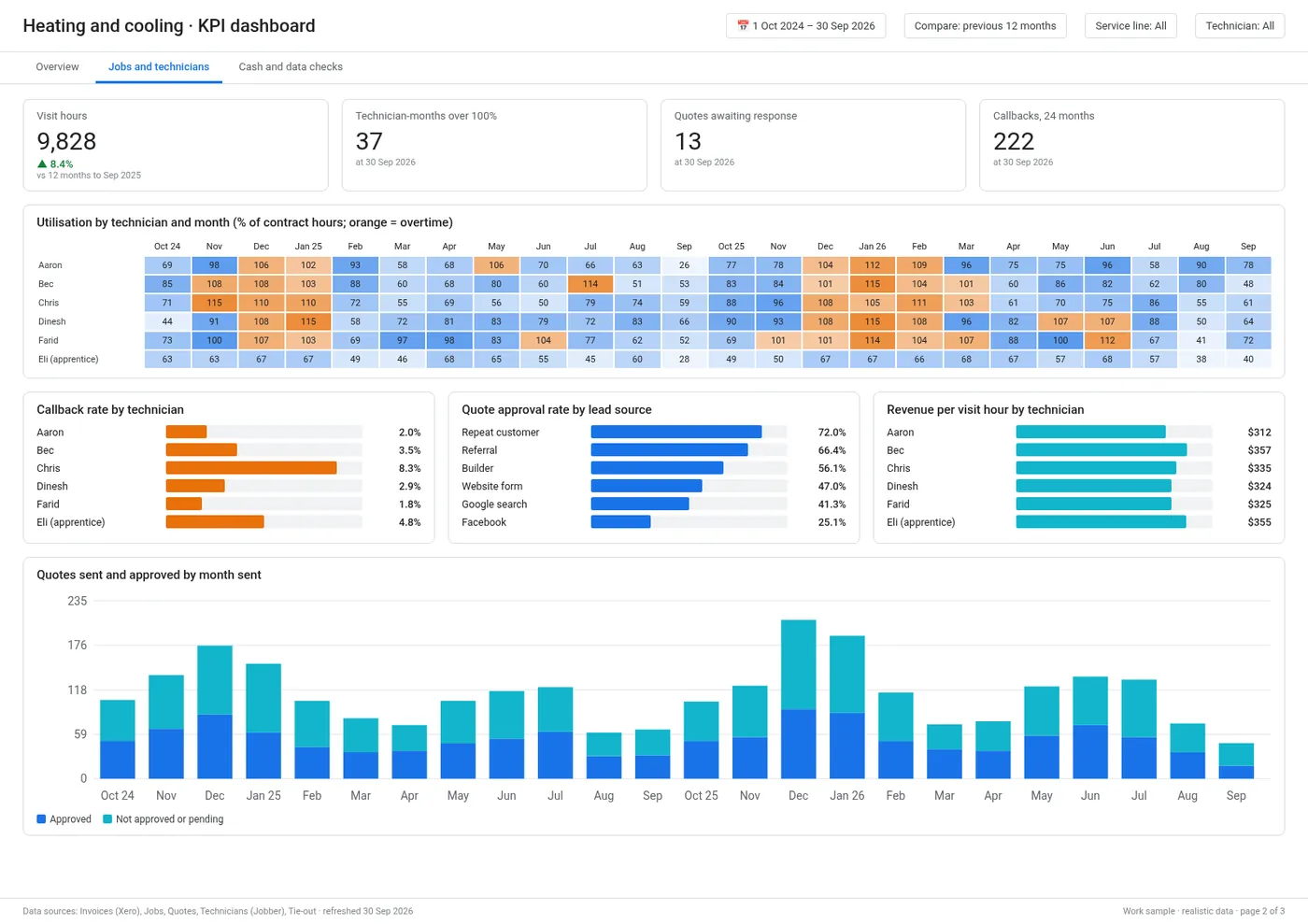
Looker-Studio-Dashboard.pdf › Jobs and technicians
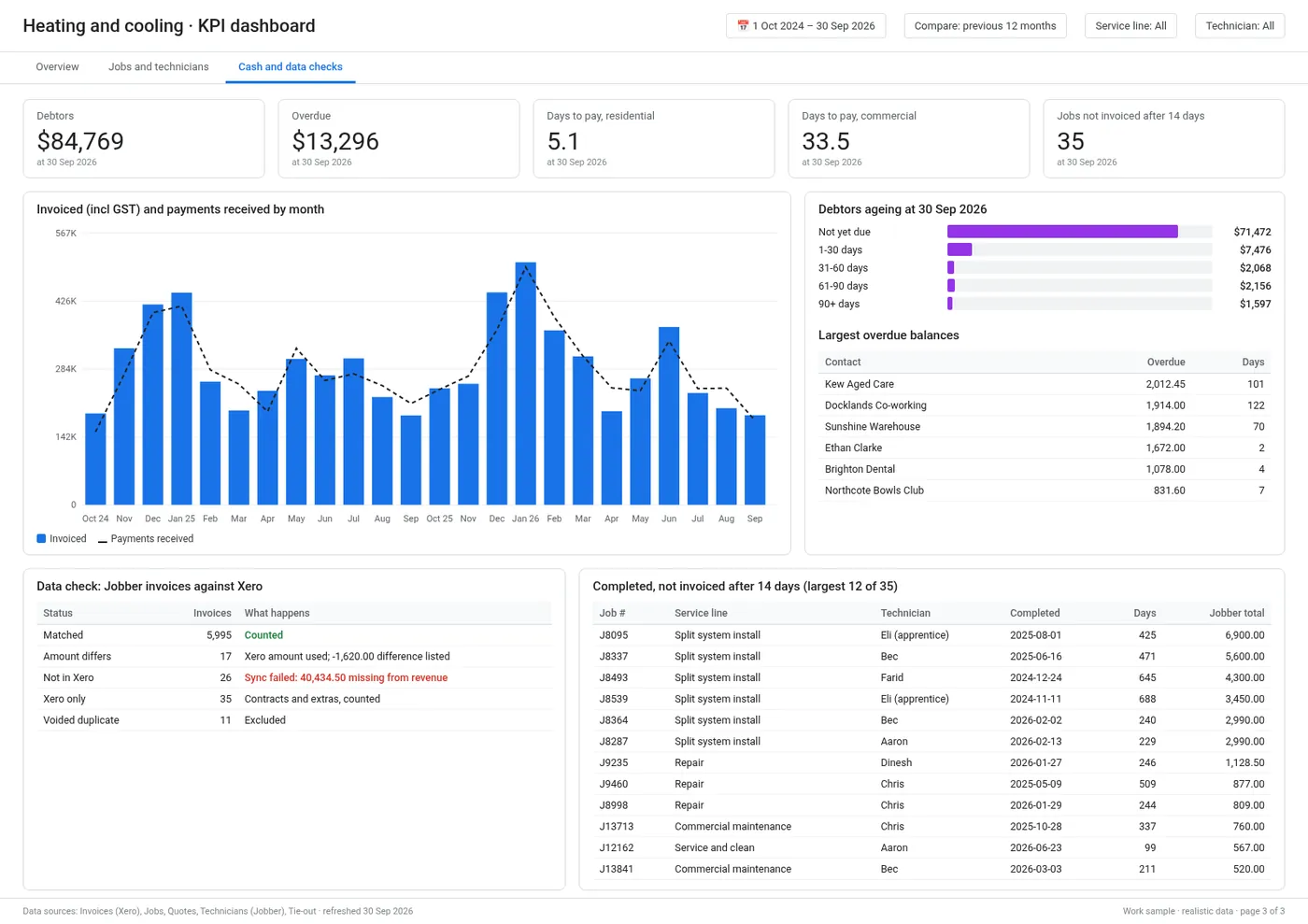
Looker-Studio-Dashboard.pdf › Cash and data checks
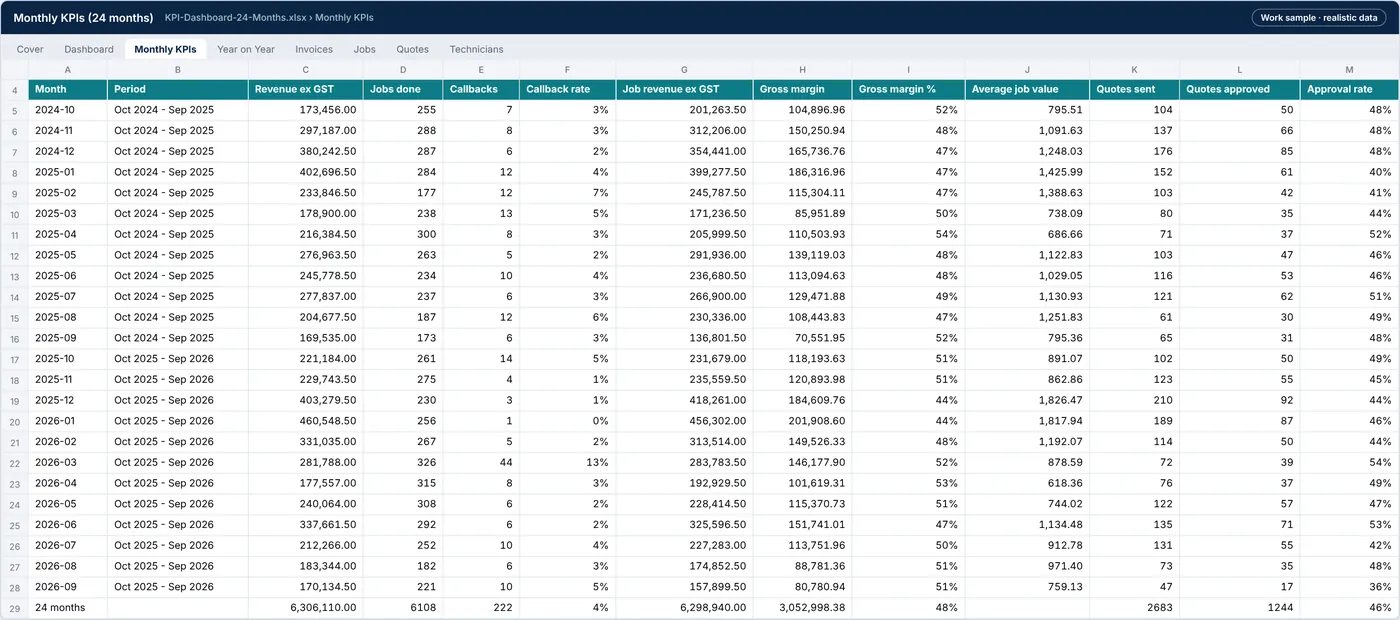
KPI-Dashboard-24-Months.xlsx › Monthly KPIs
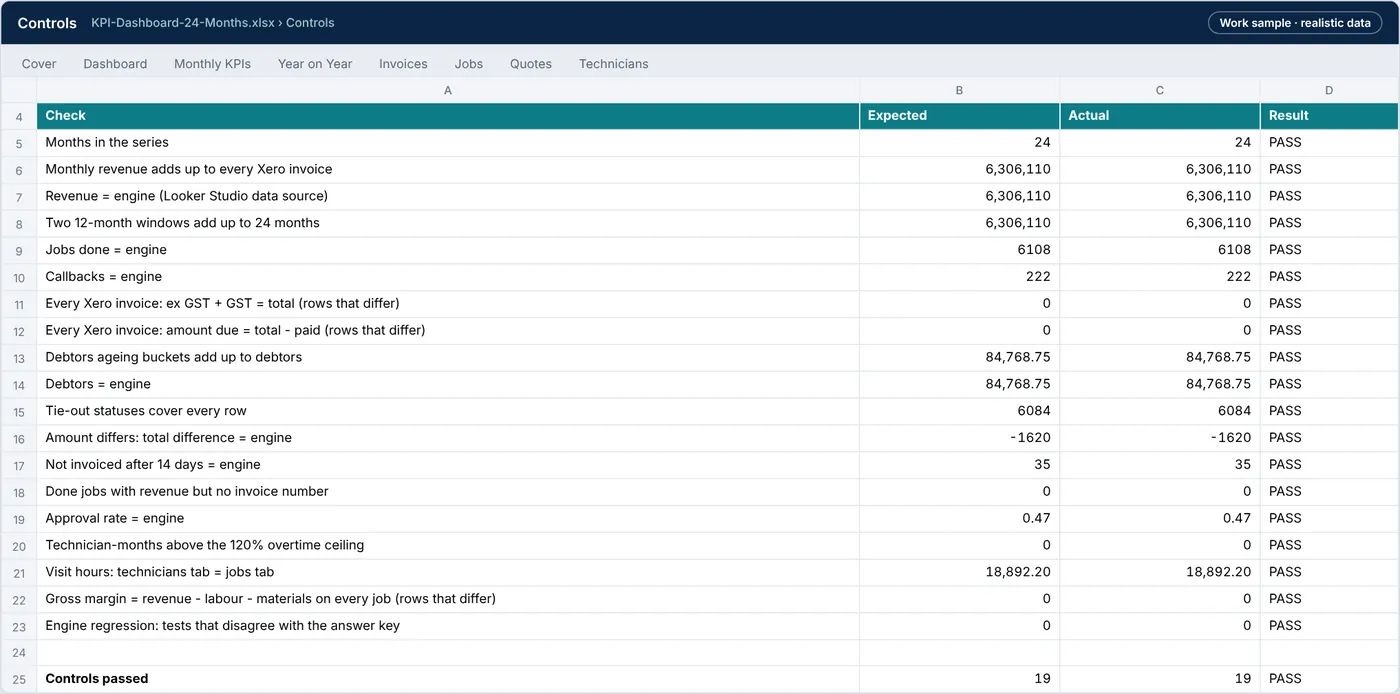
KPI-Dashboard-24-Months.xlsx › Controls
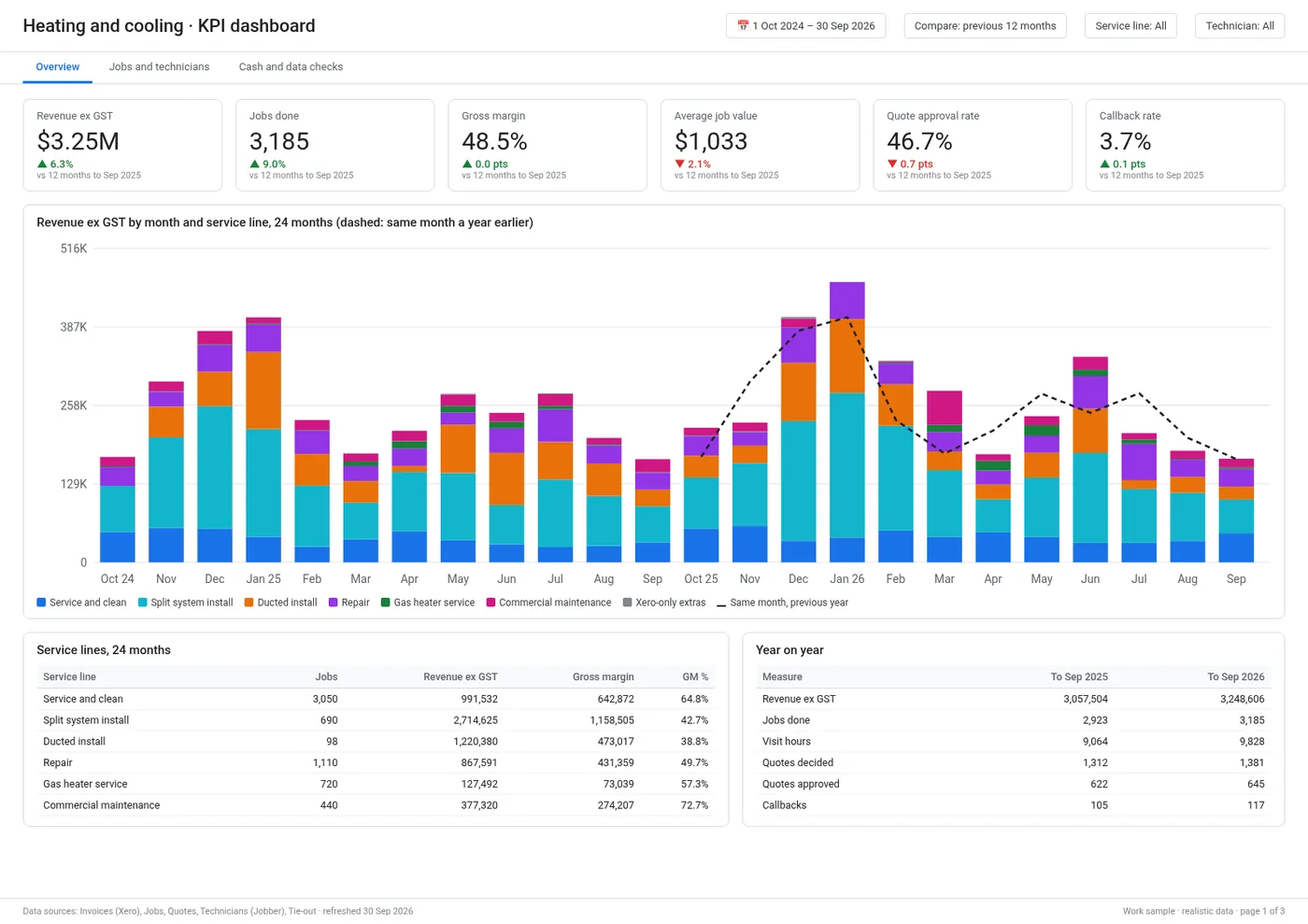
Looker-Studio-Dashboard.pdf › Overview
| File | What it is | Size |
|---|---|---|
| KPI-Dashboard-24-Months.xlsx | Workbook (13 tabs): dashboard, 24-month KPI series, year on year, the four Looker Studio data source tabs, Jobber-Xero tie-out, not invoiced, field definitions, controls and test log | 1.6 MB |
| Looker-Studio-Dashboard.pdf | The three dashboard pages: Overview, Jobs and technicians, Cash and data checks | 157.9 KB |
| KPI-Dashboard-Report.pdf | Report (10 pages): scope, the dashboard pages, year on year, data checks, controls, tests and handover | 849.5 KB |
| Executive-Summary.pdf | One-page executive summary | 111.7 KB |
| engine.py | Engine: fact tables, Jobber-Xero tie-out, KPI definitions, 24-month series, year on year and the test against the answer key | 17.7 KB |
| KPI-Dashboard-data-and-code.zip | Inputs as exported from Jobber and Xero (CSV), the Looker Studio data source tables, and the scripts that rebuild the workbook, dashboard and report | 930.8 KB |
Tell me what’s bugging you and I’ll tell you where I’d look first.
Send a short note on Upwork about what is slowing the business down. I’ll reply with where I’d start, and whether the US$300 Systems Health Check is the right first step.